Key Takeaways:
- Magento 2 extensions help improve functionality, user experience, and store performance without heavy development.
- Choosing the right Magento extensions is essential for maintaining speed, security, and scalability.
- Always check reviews, ratings, and developer credibility before installing any extension.
- Focus on compatibility with the latest Magento version to avoid technical issues.
- Avoid installing too many extensions, as this can impact performance and create conflicts.
- Test every extension in a staging environment before deploying it on your live store.
- Consider custom Magento extensions when your business needs unique features or better control.
- Working with experienced Magento developers helps ensure better results and long-term success.
Today, customer expectations are higher than ever. Speed, personalisation, and seamless user experience now define success in online retail. Magento 2 meets these demands with strong performance, advanced security, and modern integrations.
However, the real strength of Magento lies in its extension ecosystem. Magento 2 extensions allow you to enhance your store’s functionality without complex development. You can improve SEO, streamline checkout, automate processes, and boost conversions with the right tools.
That said, not every extension delivers value. With thousands of Magento plugins available, choosing the right one can feel overwhelming. Poor-quality or outdated extensions can slow down your website, create conflicts, or even introduce security risks.
This is why selecting the right Magento 2 extension is not just a technical step. It is a critical business decision. In this guide, we will help you understand how to choose the best Magento extensions for your store, based on performance, security, and long-term scalability.
Why Are Magento 2 Extensions Essential for Modern eCommerce?
Magento 2 extensions play a key role in improving your store’s capabilities. They allow you to add advanced features without building everything from scratch.
For example, you can enhance checkout, automate marketing, manage inventory, or improve SEO performance. This flexibility helps businesses respond quickly to changing customer expectations.
In 2026, eCommerce will be more competitive than ever. Customers expect fast loading pages, personalised journeys, and smooth transactions. Magento extensions help you meet these expectations without increasing development time.
Moreover, extensions support business growth. As your operations expand, you can add new tools to manage orders, customers, and integrations. This makes Magento a future-ready platform.
However, choosing the right extension is critical. A poor choice can affect speed, security, and user experience. That is why many businesses prefer working with experienced Magento development specialists. They help align extension choices with business goals.
Choosing the Right Magento Extensions Shouldn’t Be Guesswork
Get expert advice to select secure, high-performing extensions that match your business goals.
Speak to Our Magento Experts
A Practical Checklist for Choosing the Right Magento 2 Extension
Selecting the right Magento 2 extension requires careful evaluation. You should not install plugins without proper checks. A secure and well-built extension improves performance. On the other hand, a poor one can slow down your website or expose it to risks.
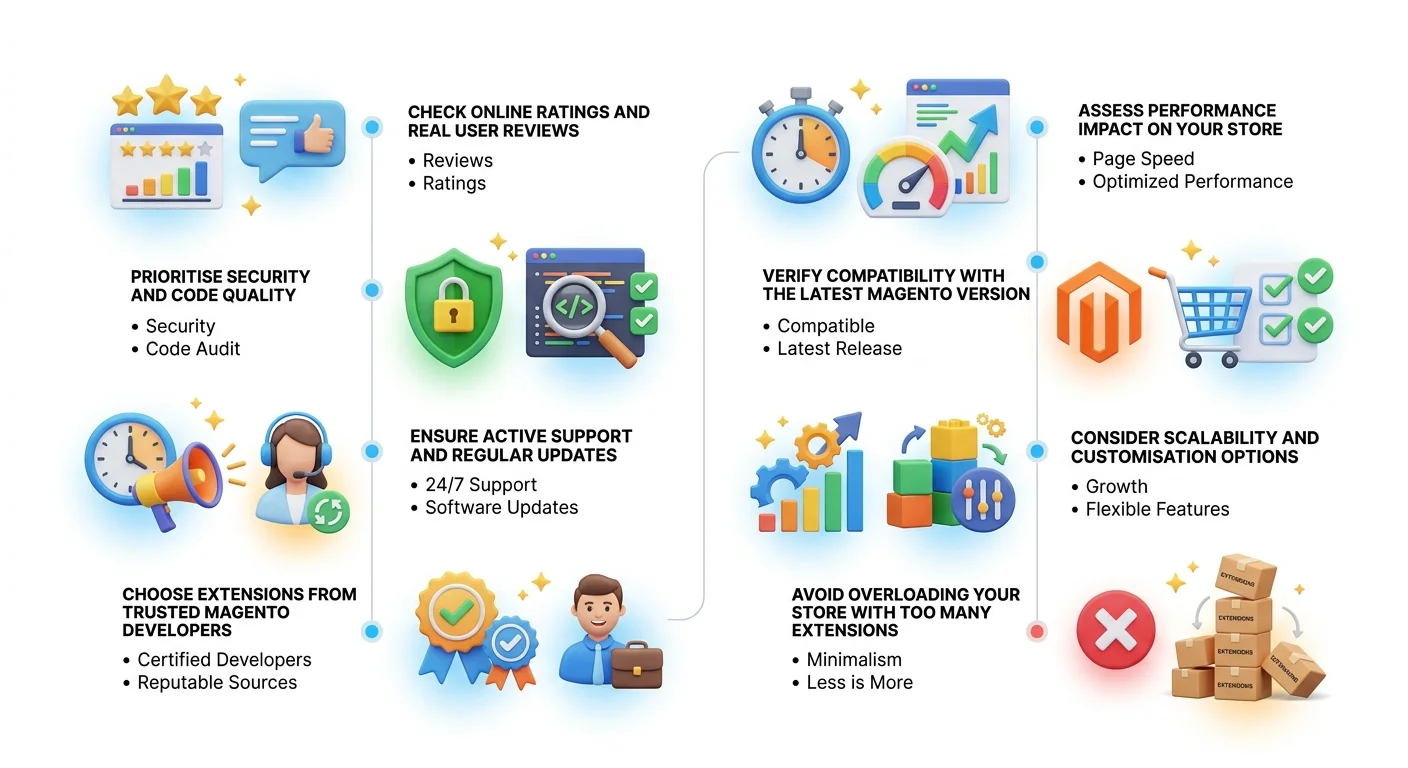
Here are the key factors you should consider before making a decision:
1. Check Online Ratings and Real User Reviews
Start by reviewing feedback from other users. This gives you a clear idea of how the extension performs in real situations.
Look for:
- Consistent positive ratings
- Detailed user experiences
- Feedback on bugs or issues
Always choose extensions from trusted sources such as the official Magento marketplace or well-known providers.
This step helps you avoid unreliable or poorly maintained plugins.
2. Prioritise Security and Code Quality
Security is one of the most important factors in 2026. Cyber threats are increasing, especially in eCommerce.
Before installing any extension, make sure it:
- Is free from malware or hidden code
- Follows Magento coding standards
- Receives regular security updates
A secure extension protects customer data and maintains your brand reputation. If needed, ask your development partner to review the code before installation.
3. Ensure Active Support and Regular Updates
Every extension needs ongoing support. Issues can arise due to updates or conflicts with other tools. Active support ensures that your store runs smoothly without long downtime.
So, always choose extensions that offer:
- Regular version updates
- Clear documentation
- Fast and reliable support
4. Choose Extensions from Trusted Magento Developers
The credibility of the developer matters a lot.
Always select extensions built by:
- Magento-certified developers
- Established solution providers
- Developers with proven experience
Check their portfolio, reviews, and update history. Reliable developers follow best practices and build stable extensions. This reduces the risk of performance issues.
5. Assess Performance Impact on Your Store
Some extensions may look useful but can slow down your website. In 2026, site speed directly impacts SEO rankings and conversions. Even a one-second delay can reduce sales. Always choose lightweight and optimised extensions that do not affect performance.
Before installing, test:
- Page load speed
- Checkout performance
- Server response time
6. Verify Compatibility with the Latest Magento Version
Magento releases regular updates to improve security and functionality. Your extension must support the latest version. Otherwise, it may break your store or create conflicts. This ensures long-term stability.
Always check:
- Version compatibility
- Update frequency
- Support for future upgrades
7. Consider Scalability and Customisation Options
Your business will grow over time. Your extensions should support that growth. This will help you avoid replacing extensions later.
Choose solutions that:
- Allow easy customisation
- Support integrations with third-party tools
- Scale with increasing traffic and orders
8. Avoid Overloading Your Store with Too Many Extensions
Many businesses install too many plugins. This creates conflicts and slows down the system. Instead, focus on quality over quantity. Only install extensions that add real value to your store. A clean and optimised setup always performs better.
Need Help Shortlisting the Best Magento Extensions?
Our team helps you evaluate, test, and implement the right extensions for long-term performance.
Get Expert Recommendations
Common Mistakes to Avoid When Choosing Magento Extensions
Many businesses rush the selection process and face issues later. As a result, they deal with slow performance, security risks, and poor user experience. In many cases, these problems could have been avoided with proper research. Therefore, it is important to take a careful and informed approach when selecting Magento extensions.
Key Mistakes to Watch Out For
- Avoid installing too many extensions, as this can slow down your store and create conflicts.
- Do not choose plugins based only on price, as cheaper options often lack quality and support.
- In addition, always check compatibility with your Magento version and review the performance impact before installation.
- Finally, make sure the developer is reliable and provides regular updates.

When Should You Build a Custom Magento Extension?
Sometimes, ready-made extensions may not fully meet your business requirements. While they offer convenience, they often come with limitations in features or flexibility. In such cases, relying on a custom solution becomes a more practical and future-ready approach.
When Custom Development Makes Sense
Consider a custom Magento extension if your business has unique workflows or requires specific third-party integrations. It is also a better option when existing extensions do not scale with your growth. Moreover, custom development gives you better performance, improved security, and full control over functionality, which is essential for long-term success.
Conclusion
Choosing the right Magento 2 extensions can make a real difference to your store’s performance, security, and growth. The right extensions help you improve user experience, streamline operations, and increase conversions. However, poor choices can slow down your site and create long-term issues.
That is why it is important to follow a structured approach. Focus on quality, compatibility, and long-term scalability rather than quick fixes.
At the same time, working with experienced Magento professionals can simplify the process. Expert guidance ensures that every extension aligns with your business goals and delivers real value. As Magento continues to evolve, smart extension selection will remain a key part of building a successful and future-ready eCommerce store.
Need Expert Help with Magento Extensions?
Make the right choices from the start and avoid costly mistakes later.
IDS Logic offers end-to-end Magento eCommerce development services, including extension selection, custom development, integration, and ongoing support. With over 18 years of experience, their team delivers secure, scalable, and high-performing Magento solutions tailored to your business needs.
Get in Touch with Our Magento Experts