Your Sitefinity website may be working perfectly today.
Pages load. Forms work. Customers can access your content. Your team can manage the website.
But that doesn’t necessarily mean the underlying platform is secure.
For organisations that rely on their website for lead generation, customer engagement, ecommerce or business information, keeping the CMS up to date is an important part of ongoing website management.
One common misconception is that businesses can simply wait for the next major Sitefinity release before addressing security concerns. However, security patches are often released specifically to address vulnerabilities in an existing version.
That means a business running an older version may not need to wait for the next major release to improve its security posture.
In a recent IDS Logic discussion, Greg spoke with Arunoday Kumar, Senior Technical Manager at IDS Logic, who has worked with the company for almost 16 years. They discussed Sitefinity security patches, outdated installations, the risks of delaying updates and how organisations can approach upgrades without unnecessary disruption.
The key message is simple:
Sitefinity security shouldn’t be treated as a one-time upgrade project. It should be part of an ongoing maintenance and risk-management strategy.
What Is a Sitefinity Security Patch?
When a vulnerability is identified in a Sitefinity version, a security update or patch may be released to address the issue.
Arunoday explains this using a simple example.
If an organisation is running Sitefinity 14.4 and a security problem is subsequently identified, the vendor may release a patched version such as 14.4.2 to address the issue.
The organisation does not necessarily need to wait until Sitefinity 15 is released.
Instead, the security patch can be applied to the existing version to address the identified vulnerability.
This distinction is important because businesses sometimes think:
“We’re going to upgrade to the next major version anyway, so we’ll deal with security when we do that.”
The problem is that the major upgrade may be months away.
If a known security vulnerability needs addressing today, waiting for a future upgrade can leave the website exposed unnecessarily.
Why Running an Unpatched Sitefinity Version Can Create Risk
A security vulnerability doesn’t automatically mean that every website running the affected version will be compromised.
However, once a vulnerability is known, attackers have more information available to investigate potentially affected websites.
As Arunoday explains, automated tools can be used to identify the Sitefinity version running on a website.
If an attacker discovers that a website is running an older version that has not received a relevant security patch, they may investigate whether the known vulnerability can be exploited.
Depending on the vulnerability and the website environment, potential consequences could include:
- Unauthorised access
- Exposure of user information
- Manipulation of website content
- Exploitation of vulnerable endpoints
- Website disruption
For a business website, the impact can extend beyond the technology itself.
A compromised website can affect customer trust, brand reputation and business continuity.

How Can Attackers Identify Outdated Sitefinity Websites?
One of the concerns discussed in the interview is how attackers identify potentially vulnerable websites.
Attackers can use automated scanning and technology-identification tools to determine which technologies and versions a website is using.
Once a Sitefinity version is identified, an attacker can investigate publicly known vulnerabilities associated with that version.
The process can therefore become:
Identify technology → Identify version → Check known vulnerabilities → Investigate potential attack paths
This is why organisations should not assume that a vulnerability will remain unnoticed simply because their website appears normal.
A website can operate normally while still requiring a security update.
What Happens If a Vulnerability Is Exploited?
The potential impact depends on the specific vulnerability, website configuration and information accessible through the application.
However, Arunoday highlights two important scenarios.
Websites containing user information
If a vulnerable website handles user information, an exploited vulnerability could potentially expose that information.
For businesses processing customer or user data, this creates an additional level of concern around privacy, trust and regulatory responsibilities.
Websites that primarily contain content
Even if a website doesn’t store sensitive customer information, it can still be targeted.
An attacker may attempt to manipulate website content so that visitors see information that the organisation did not publish.
For a UK business, this could create:
- Reputational damage
- Loss of customer confidence
- Website disruption
- Emergency recovery costs
The lesson is that security matters even when a website doesn’t process large volumes of sensitive information.
The Biggest Misconception: “Our Firewall Will Protect Us”
One of the most important points from Arunoday’s interview is a misconception that organisations may have about external security controls.
A business may think:
“We already have a firewall and antivirus software, so our website is protected.”
Firewalls, antivirus software and other security controls are important parts of a wider security strategy.
But they shouldn’t be considered a replacement for securing the CMS itself.
Arunoday uses an effective analogy:
If your body’s immune system isn’t healthy, external medicine alone won’t solve the underlying problem.
The same principle applies to a website.
Your core application needs to be maintained and secured.
External security controls should provide additional layers of protection—not become the reason an organisation delays a necessary Sitefinity security update.
Why Do Businesses Delay Sitefinity Updates?
The reasons are often practical rather than careless.
Organisations may delay upgrades because they are concerned about:
- Budget
- Internal resources
- Development time
- Testing requirements
- Business disruption
- Potential downtime
- Third-party integrations
- Payment gateway functionality
These concerns are understandable.
A business-critical website cannot simply be taken offline without considering the consequences.
For example, imagine a website with an integrated payment gateway.
The organisation may worry:
“What happens if the upgrade affects the payment process?”
That concern can lead businesses to postpone upgrades for months.
The answer isn’t to ignore the security update.
The answer is to plan the update properly and reduce the risk associated with the change.
Security Updates Don’t Always Mean a Major Upgrade
One of the most useful lessons from the interview is that businesses should distinguish between applying a security patch and planning a major version upgrade.
A major upgrade may involve broader changes to the platform and require more extensive testing.
A security patch, however, may address a specific vulnerability in the version the organisation is currently using.
This means businesses can take a two-track approach:
Immediate security management
Address relevant security vulnerabilities through appropriate patches or updates.
Longer-term platform planning
Assess whether the organisation should move to a newer Sitefinity version as part of its technology roadmap.
This avoids a situation where businesses postpone a known security fix simply because a larger upgrade is planned for the future.
How to Manage a Sitefinity Upgrade Safely
The fear of downtime is one of the biggest reasons businesses delay maintenance.
A well-planned Sitefinity upgrade should therefore include a structured process.
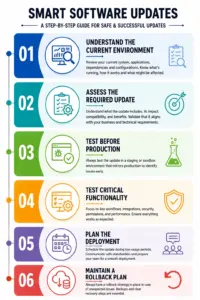
1. Understand the Current Environment
Before making changes, identify:
- Current Sitefinity version
- Custom functionality
- Integrations
- Critical website journeys
- Payment functionality
- Forms
- Third-party dependencies
Understanding the environment helps identify potential areas of risk.
2. Assess the Required Update
Determine why the update is needed and what functionality could potentially be affected.
The team should understand whether the requirement is a security patch, maintenance update or larger version upgrade.
3. Test Before Production
The upgrade should be tested in an appropriate development or staging environment before being applied to the live website.
This provides an opportunity to identify compatibility problems before customers encounter them.
4. Test Critical Functionality
The development team should validate the website after the update.
The business team should also test important user journeys.
For example:
- Contact forms
- Login functionality
- Ecommerce
- Payment processing
- Content publishing
- Integrations
5. Plan the Deployment
Choose an appropriate maintenance window and communicate the planned activity to relevant stakeholders.
6. Maintain a Rollback Plan
Even with careful testing, no technical change is completely risk-free.
A rollback plan provides confidence that the website can be restored quickly if an unexpected issue occurs.
As Arunoday explains in the interview, there may always be a small possibility that something doesn’t work as expected. The purpose of testing and rollback planning is to ensure that the organisation can respond quickly if it does.
How Long Should You Wait After a Sitefinity Security Patch Is Released?
Arunoday makes an important point here.
A security patch doesn’t necessarily mean:
“It was released today, so we must deploy it tomorrow.”
Businesses need time to assess, test and plan.
At the same time, organisations shouldn’t treat the update as something that can simply be ignored for months.
A sensible approach is to:
Monitor → Assess → Test → Schedule → Deploy → Validate
The exact timeframe will depend on the severity of the vulnerability, the website’s complexity and the organisation’s risk profile.
The important thing is to have a defined process rather than making the decision from scratch every time an update is released.
Build a Proactive Sitefinity Maintenance Process
Arunoday describes the approach used within IDS Logic projects as a collaborative process between the Sitefinity development partner and the client.
The development team monitors Sitefinity releases.
The client is also aware of relevant updates.
When a security patch is released, both sides discuss:
- Why the update is required
- What needs to be changed
- What testing is required
- When the update can be deployed
- How the deployment will be managed
This creates a more proactive relationship.
Instead of:
Security issue → Emergency → Urgent development work
the process becomes:
Monitor → Discuss → Plan → Test → Update
That difference can significantly reduce the stress associated with website maintenance.
Sitefinity Security Is a Business Issue, Not Just an IT Issue
It is easy to think about CMS updates as a technical responsibility.
But the consequences of poor maintenance can affect the entire organisation.
Consider a business website that generates leads.
If the website becomes unavailable:
Website downtime → Lost enquiries → Lost opportunities
For an ecommerce organisation:
Website problem → Payment disruption → Lost revenue
For an organisation handling customer information:
Security incident → Data concerns → Reputation and compliance risk
This is why Sitefinity maintenance should be discussed not only by developers but also by business stakeholders.
The question isn’t simply:
“Do we have the latest version?”
It should be:
“Is our website being maintained at a level that is appropriate for its importance to our business?”
Sitefinity Upgrade Checklist for UK Businesses
If your organisation operates a Sitefinity website, consider asking:
Platform
- What Sitefinity version are we currently running?
- Are we monitoring Sitefinity releases?
- Are relevant security patches being reviewed?
Security
- Have we assessed known vulnerabilities affecting our version?
- Are our application security controls up to date?
- Are we relying too heavily on external security tools?
Website
- What custom functionality does our website contain?
- Which integrations could be affected by an update?
- Does the website process payments or sensitive information?
Upgrade Planning
- Do we have a staging environment?
- Have critical website journeys been documented?
- Do we have a backup and rollback plan?
- Who is responsible for post-upgrade testing?
Governance
- Who monitors Sitefinity security updates?
- How quickly can the business approve an important security patch?
- Is maintenance included in our ongoing website strategy?
If you don’t know the answer to several of these questions, your organisation may benefit from a Sitefinity health check.
How IDS Logic UK Approaches Sitefinity Security and Upgrades
A successful Sitefinity upgrade isn’t simply about installing a new version.
Every website has its own combination of:
- Custom Sitefinity development
- Content
- Integrations
- Business processes
- Third-party services
- Payment functionality
At IDS Logic UK, our approach is to understand the existing environment first, assess the required update, plan the change, test critical functionality and provide a rollback strategy before production deployment.
We also believe security updates should be treated as an ongoing conversation between the development partner and the client.
That means monitoring relevant Sitefinity releases, discussing the implications and planning maintenance before an issue becomes an emergency.
Final Thoughts
Sitefinity security isn’t something businesses should think about only when a major version is released.
Security patches exist for a reason.
If a vulnerability has been identified in the version you’re running, waiting for a future major upgrade may leave an unnecessary period of exposure.
At the same time, businesses don’t need to approach every update with panic.
A structured process can make Sitefinity maintenance much more manageable:
Monitor → Assess → Test → Deploy → Validate → Roll Back if Required
The goal isn’t simply to keep Sitefinity “up to date”.
The goal is to keep your website secure, reliable and capable of supporting the business without unnecessary disruption.
As Arunoday explains, giving organisations confidence in the upgrade process is an important part of successful Sitefinity maintenance. With appropriate planning, testing and a rollback strategy, businesses can address security requirements without treating every update as a major operational risk.
Is Your Sitefinity Website Due for an Upgrade or Security Review?
Not sure which Sitefinity version you’re running, whether your current environment requires a security update, or how much risk an upgrade could introduce?
IDS Logic can help you assess your Sitefinity environment and plan the next step.
Our Sitefinity specialists can help with:
- Sitefinity version and upgrade assessment
- Security patch planning
- Sitefinity upgrades
- Custom functionality assessment
- Integration compatibility
- Testing and deployment planning
- Ongoing Sitefinity maintenance
Whether you’re dealing with a specific security update or want to establish a proactive Sitefinity maintenance strategy, our team can help you plan the work around your business requirements.