Our world today runs on websites and mobile apps. Every day, new digital experiences appear, faster, smarter, and more engaging than ever. Yet, users have become more demanding. They expect every website or app to load instantly, work offline, and perform smoothly across all devices.
According to Google, more than 53% of users abandon a site if it takes longer than three seconds to load. Slow pages mean lost visitors and missed revenue opportunities. Businesses now face the challenge of keeping customers engaged without over-investing in multiple platforms.
This is exactly where Progressive Web Apps (PWAs) step in. They blend the best of websites and native mobile apps, giving users a fast, secure, and app-like experience directly in their browser. PWAs load quickly, even on poor networks, and can work offline, thanks to advanced caching and background updates.
As PWA development continues to evolve, it’s changing the future of web apps and how businesses approach online engagement. From small startups to global enterprises, many are shifting to PWAs to cut development costs, reach wider audiences, and deliver a consistent digital experience across every device.
In today’s mobile-first world, where users switch between desktops, tablets, and phones in seconds, Progressive Web Apps offer the flexibility, reliability, and performance modern consumers expect. They mark the next big step in web development, combining the accessibility of the web with the power of native applications, shaping the future of PWA apps and digital innovation as we move through 2025 and beyond.
What is a Progressive Web App (PWA)?
A Progressive Web App (PWA) is a type of web application designed to offer a mobile app-like experience directly through a web browser. It combines the accessibility of a website with the speed, functionality, and convenience of a native mobile app, without the need to download anything from an app store.
With a PWA, users can add the app to their home screen with just one tap. Once installed, it loads almost instantly, even with a weak or no internet connection. This is made possible through service workers, a modern web technology that allows content to be cached for offline use.
PWAs are responsive, which means they automatically adjust to different screen sizes, whether you’re on a phone, tablet, or desktop. They can also send push notifications to keep users updated and engaged, much like traditional mobile apps.
In simple terms, PWAs blend the best parts of the web and mobile worlds. They are lightweight, secure, and easy to maintain, a perfect fit for businesses that want to improve user engagement without building separate apps for iOS and Android.
What Makes Progressive Web Apps Stand Out?
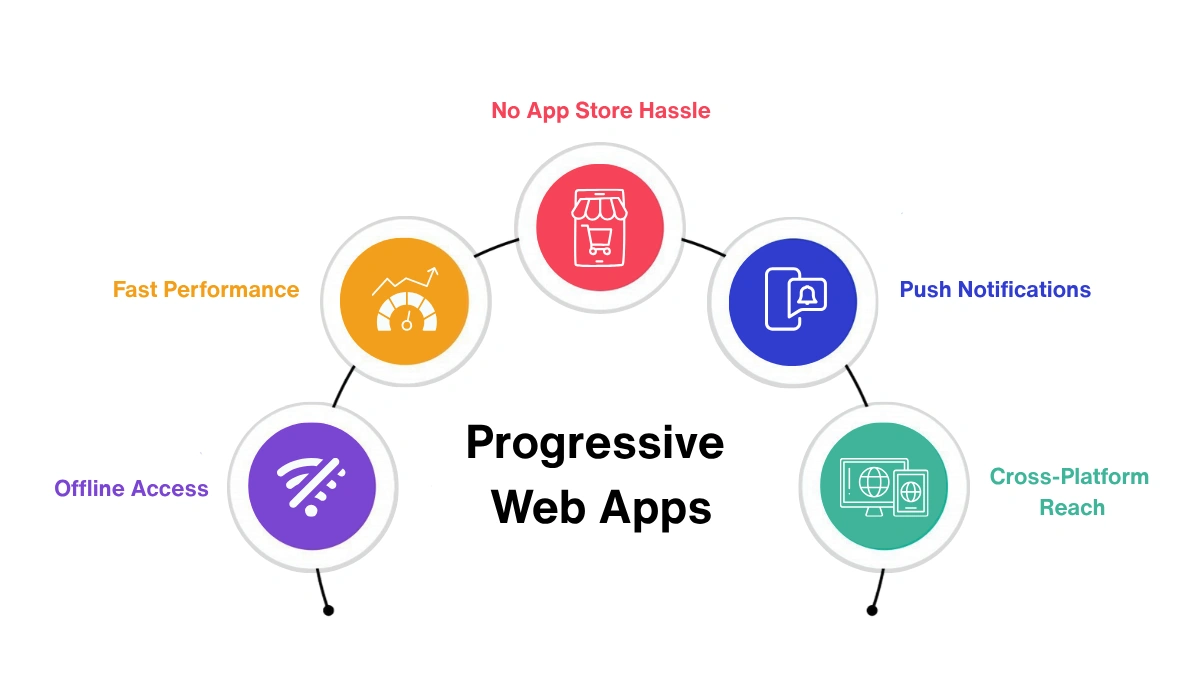 The rise of Progressive Web Apps marks a big shift in the future of web apps. They solve many of the issues that businesses and users have faced for years, from slow load times to poor retention. Here’s what makes them special:
1. Offline Access
PWAs work even without an internet connection, ensuring a reliable experience anytime.
2. Fast Performance
They load quickly thanks to advanced caching, giving users a smooth, app-like feel.
3. No App Store Hassle
Users can add the app straight from their browser, no downloads, no delays.
4. Push Notifications
PWAs can re-engage users by sending updates or reminders directly to their devices.
5. Cross-Platform Reach
One version works perfectly across all major devices and operating systems.
How Progressive Web App (PWA) Development Enhances the Browsing Experience?
A smooth browsing experience shapes how users see your website. No one enjoys slow pages or losing access when the internet drops. Progressive Web App (PWA) development fixes this by blending the best of mobile apps and websites, fast, reliable, and engaging.
PWAs load instantly, work offline, and deliver an app-like feel right in the browser. For businesses, this means lower bounce rates, better engagement, and improved mobile web performance. In short, PWAs redefine how users experience the modern web.
1. Delivers a Smooth, App-like Experience
A Progressive Web App (PWA) makes browsing feel more like using a native mobile app. When visitors open your site in a browser, it loads fast and runs smoothly, even if the internet connection is weak. Returning users enjoy an even faster load time because the app remembers their previous visit.
PWAs also give frequent visitors the option to install the app directly on their home screen. This simple feature helps users stay connected to your brand and access your website instantly, just like a regular mobile app.
2. Increases Customer Engagement
One of the strongest benefits of PWA development is the ability to send push notifications. When users visit a PWA-enabled website, they often see a prompt asking if they want to receive updates. Once they allow it, the website can send alerts about new content, offers, or messages, even when they’re not browsing the site.
This direct communication keeps your audience engaged and encourages them to revisit your platform more often. For brands, it’s an easy and cost-effective way to build long-term customer relationships.
3. Makes Websites Faster and More Reliable
Speed is one of the biggest reasons why Progressive Web Apps are the future of web development. PWAs use a smart technology called service workers that run quietly in the background. They manage how content loads and what gets stored, allowing the app to perform smoothly, even on slow or unstable networks.
Because of this, users experience fewer delays, smoother navigation, and faster responses, all of which make your website feel more trustworthy and professional.
4. Offers Offline Access and Continuous Connectivity
Another major advantage of PWA technology is offline access. Thanks to service workers, users can still browse previously loaded content without an active internet connection. The app automatically updates itself in the background whenever the network returns.
This feature is extremely useful for businesses that want to keep users connected anytime, anywhere. Whether it’s reading blog posts, checking past orders, or viewing saved pages, your visitors never lose access to key content, and that builds trust.
5. Why It Matters for the Future of Web Development
In today’s fast-paced digital world, users expect websites to load instantly and work seamlessly. PWAs meet these expectations by blending the best of websites and mobile apps, offering a fast, interactive, and reliable experience without the cost of native app development.
With faster load times, higher engagement, and offline functionality, Progressive Web Apps are redefining the future of mobile web development. For businesses looking to enhance their user experience and reduce bounce rates, PWAs are the smartest way forward.
How to Get Started with Progressive Web App (PWA) Development?
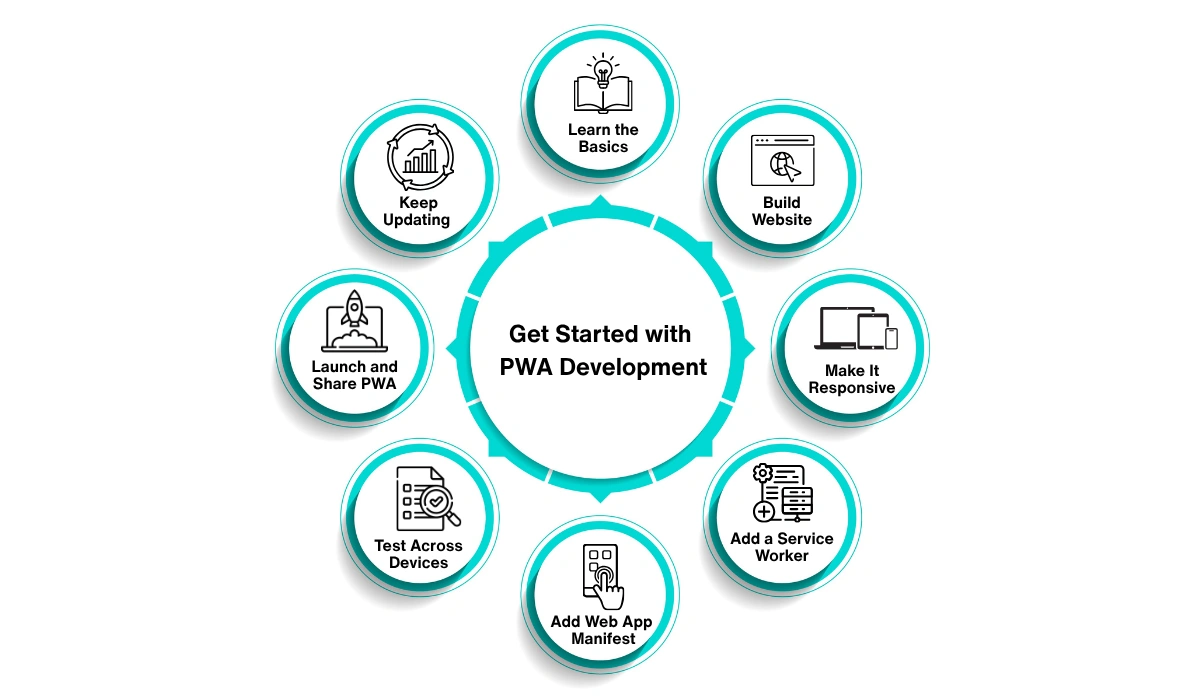
Starting with Progressive Web App (PWA) development may sound a bit technical at first, but once you break it down, it’s surprisingly simple. The goal is to create a website that behaves like an app, fast, engaging, and easy to access on any device. Let’s walk through the steps to get started.
1. Learn the Basics
Before you dive in, take some time to understand what a Progressive Web App really is. Think of it as a modern website that feels and functions like a mobile app. It loads quickly, works offline, and can be installed directly on a user’s device.
A good way to understand how PWAs work is to explore examples like Twitter Lite, or Pinterest, all of which use PWA technology to offer fast and reliable user experiences.
2. Build or Optimise Your Website
If you already have a website, that’s your starting point. If not, create a simple one using HTML, CSS, and JavaScript. Make sure your website performs well and looks good across all screen sizes. Your existing website will form the foundation of your PWA.
The goal here is to ensure that the site is clean, mobile-friendly, and capable of delivering a quick and smooth browsing experience.
3. Make It Responsive
Responsiveness is key to any successful PWA. Your website should automatically adjust to different screen sizes, whether viewed on a smartphone, tablet, or desktop. Use flexible layouts and responsive images to maintain consistency across devices.
A responsive design not only improves usability but also boosts SEO and user satisfaction.
4. Add a Service Worker
Here’s where the magic begins. A service worker is a background script that allows your app to work offline and load instantly. It stores important files in the browser’s cache, so users can still access content even without an active internet connection.
Start with a simple service worker that caches key pages or assets. As you gain experience, you can add advanced features like background updates or push notifications.
5. Create a Web App Manifest
Next, add a web app manifest, a small JSON file that tells browsers how your PWA should appear and behave. This includes details like the app’s name, icon, and theme colour.
Once it’s ready, users will be able to install your PWA directly on their home screen, just like any native mobile app. This simple step helps your site stand out and feel more integrated with the user’s device.
6. Test Across Devices
Testing is an important part of Progressive Web App development. Use tools such as Google Lighthouse to measure performance, accessibility, and loading speed. Make sure your app works smoothly across browsers and devices, and check that it performs well even on slow networks.
Good testing ensures that users always get a consistent, app-like experience no matter how they access your site.
Read More : What Are the Benefits Of A/B Testing in Progressive Web Apps
Discover how A/B testing improves user engagement, boosts conversions, and helps you make data-driven decisions for your PWA.
7. Launch and Share Your PWA
Once you’re satisfied with performance and design, it’s time to launch. Host your PWA on a secure web server and make it live. Share the link across your channels, and encourage users to “Add to Home Screen” for easy access. This simple call to action can significantly increase engagement and repeat visits.
8. Keep Updating and Improving
Building a Progressive Web App is just the beginning. The digital world keeps evolving, so keep refining your PWA. Regular updates, performance tweaks, and new features will keep users engaged. Listen to user feedback and continue to enhance the browsing experience.
Over time, these small improvements will help your business build a strong and reliable presence on the web.
Does It Make Sense to Invest in a Progressive Web App (PWA)?
For most businesses today, building a native mobile app can be expensive and time-consuming. You need different versions for iOS, Android, and the web, each requiring separate maintenance and updates. In contrast, Progressive Web App (PWA) development offers a far more practical solution.
PWAs allow users to start engaging with your platform instantly, no downloads, no waiting. They work directly from a browser and can be saved on a home screen, making access quick and convenient. With features like push notifications, offline access, and faster load times, they deliver an experience that rivals native apps without the heavy investment.
What makes PWAs even more appealing is their versatility. They combine the reliability of a website with the performance of a mobile app, ensuring your users get the best of both worlds. For businesses, that means better retention, higher engagement, and lower development costs. In short, investing in a Progressive Web App today is a smart step towards future-proofing your digital presence.
Final Thoughts
There’s no doubt that Progressive Web Apps are reshaping the way users experience the web. They bring together speed, reliability, and user engagement, all while cutting down on the cost and complexity of native app development.
As more companies move away from “mobile-only” app strategies, PWAs are becoming the go-to choice for brands that want performance, reach, and flexibility in one package. They are not just a trend, they represent the future of mobile web development, giving businesses a powerful way to stay connected with their audiences.
If you’re planning to build a Progressive Web App or upgrade your current website into one, our expert web and app development team can help. We specialise in building scalable, user-friendly, and future-ready PWAs that boost engagement and drive results. Let’s turn your idea into a fast, reliable, and modern digital experience that your users will love.

Frequently Asked Questions
Q1. What is an example of a Progressive Web App (PWA)?
A well-known example is Twitter Lite. It looks and feels like a mobile app but runs directly in the browser. It works offline, loads quickly, and even sends push notifications, all without needing to be installed from an app store.
Q2. What’s the difference between a Progressive Web App (PWA) and a regular web app?
A PWA is an enhanced version of a web app. While a normal web app runs in the browser, a PWA includes extra features like offline use, faster performance, and the ability to be added to your device’s home screen. It gives users an app-like experience with the convenience of the web.
Q3. Is Amazon using Progressive Web App technology?
Yes. Amazon has adopted PWA technology for parts of its mobile site. It’s designed for speed, smooth navigation, and offline functionality, making online shopping faster and easier for users worldwide.
Q4. Are Progressive Web Apps (PWAs) good for SEO?
Yes. PWAs are great for SEO because they’re built using standard web technologies such as HTML, CSS, and JavaScript, which means search engines can easily crawl and index them. They also load faster, improving user engagement and search rankings.
Q5. How can we convert our existing website into a PWA?
To transform your website into a Progressive Web App, follow a few key steps:
- Add a web app manifest that includes your app’s name, icons, and theme.
- Implement service workers to enable offline access and caching.
- Make sure your site is responsive across all devices.
- Use HTTPS for better security.
Finally, test and optimise your PWA using tools like Lighthouse before launching it. By doing this, you’ll create a fast, secure, and engaging app-like experience right within the browser, without the need for users to download anything.