
A Sitefinity website can perform well for years before growing traffic, content and integrations begin exposing weaknesses. Campaign peaks can make those issues much easier to spot.
Pages may slow during busy periods. Releases become harder to control, while infrastructure costs can lose predictability. The CMS often gets blamed first, even when the constraint sits elsewhere.
Hosting architecture, database behaviour, caching, monitoring and deployment design all influence Sitefinity CMS performance.
Running Sitefinity CMS on Microsoft Azure gives you more control over these layers. Still, moving to Azure does not guarantee a faster website.
A well-planned Sitefinity on Azure environment can support scaling, controlled releases, monitoring and stronger resilience. Your application architecture still determines how much value those capabilities deliver.
Official Sitefinity guidance covers Azure App Service, Azure SQL Database, Redis caching, scalability and application monitoring.
This guide explains how to approach Sitefinity CMS Azure hosting in 2026 without treating cloud migration as an instant performance fix.
Deploying Sitefinity CMS on Azure App Services
When organisations deploy Sitefinity CMS on Azure, the platform uses network communication between application nodes to support load-balanced environments. This setup ensures traffic is distributed across multiple instances, which improves website stability during high traffic periods.
What Changes When You Run Sitefinity on Azure?
Traditional hosting often relies on fixed resources. That works until demand changes. A large campaign may suddenly bring thousands of additional requests. Another month may remain relatively quiet.
Fixed infrastructure makes that variation harder to manage efficiently.
Sitefinity Azure hosting gives you more flexibility because resources can scale around workload requirements. App Service also removes much of the physical server management associated with traditional hosting.
Azure manages the underlying cloud platform. It does not automatically maintain your Sitefinity application, custom code or extensions.
Your team still needs to manage:
- Sitefinity updates and security patches
- custom development
- integrations
- application configuration
- deployment testing
- performance optimisation
- database behaviour
- monitoring and incident response
That division of responsibility matters. Azure can simplify infrastructure operations, while your team still owns Sitefinity application quality, configuration and maintenance.
What Does a Sitefinity Azure Architecture Usually Include?
Good Sitefinity Azure performance rarely depends on one service. App Service, Azure SQL, caching and monitoring need to work as one architecture. Official Sitefinity guidance identifies these components as important parts of an Azure deployment.
Azure App Service for the Application Layer
Sitefinity Azure App Service hosting gives teams a managed platform for running the application. You avoid managing the underlying physical servers.
App Service also supports scaling, deployment automation, monitoring and high-availability configurations.
This reduces infrastructure administration, but your App Service plan still needs sensible sizing.
An undersized plan can struggle during traffic peaks. An oversized plan may increase spending without delivering useful value.
Azure SQL Database for Sitefinity Data
A Sitefinity website relies heavily on its database. Slow database operations can affect content retrieval, administration and page delivery. Sitefinity Azure SQL therefore deserves the same planning attention as the application itself.
Progress supports Microsoft Azure SQL as a Sitefinity database platform. Its current documentation also recommends Azure SQL Database for Azure deployments.
Monitor database load, query behaviour and resource utilisation after launch. Moving a slow database into Azure does not automatically repair inefficient queries or poor application behaviour.
Distributed Caching for Multi-Instance Environments
Caching becomes particularly important when several application instances serve the same website. A Sitefinity Redis cache can support communication between nodes and distributed output caching.
Progress specifically documents Redis for these scenarios in Azure App Service. Microsoft’s Redis retirement roadmap now makes cache planning especially important for new deployments.
Monitoring Through Application Insights
Server metrics do not always explain why an important user journey feels slow.
A Sitefinity Application Insights setup can expose response times, failed requests, dependencies and application behaviour. Sitefinity also provides an Application Insights integration for application telemetry and logging.
That evidence helps teams investigate the cause instead of guessing from infrastructure metrics alone.
Top Advantages of Running Sitefinity CMS on Azure App Services
Businesses deploying Sitefinity CMS on Azure App Services can benefit from several important features:
- Faster deployment of Sitefinity environments
- Automatic updates and platform maintenance
- Built-in monitoring and performance management tools
- Reliable global infrastructure with high availability
In addition, Azure allows businesses to manage resources through App Service plans.
The App Service plan defines the computing resources used by the website, including CPU power, memory, and server capacity.
Organisations can easily adjust these resources based on their website requirements.
As website traffic grows, administrators can scale the infrastructure quickly without downtime. This flexibility helps businesses maintain consistent website performance while keeping operational costs under control. Because of these capabilities, many organisations now choose Azure hosting for Sitefinity CMS to support modern, scalable, and high-performance websites.

Steps to Deploy Sitefinity CMS from Azure Marketplace
Follow these steps to download and deploy the Sitefinity CMS application from the Azure Marketplace and run it on Azure App Services.
1. Log in to the Azure Portal – Open the Microsoft Azure portal and sign in using your Azure account credentials.
2. Create a New Resource – From the left navigation panel, select “Create a resource” to begin the deployment process.
3. Search for Sitefinity in Azure Marketplace – Use the Azure Marketplace search bar to find the Sitefinity CMS application.
4. Select the Sitefinity Application – Choose the Sitefinity CMS offering and start the deployment process.
5. Configure the App Service Plan – Fill in the required details such as the App Service plan name, subscription details, and SQL server configuration.
6. Select Subscription and Resource Group – Choose your Azure subscription. It is recommended to create a separate resource group specifically for the Sitefinity deployment.
7. Choose App Service Plan and Location – Select the App Service plan type and deployment location. In most cases, the resource group and service location remain the same.
8. Configure the Sitefinity Application Name – Enter the name for your Sitefinity CMS application. Azure will automatically generate a default URL such as: sitefinitysitename.azurewebsites.net
You can later configure a custom domain name through Azure settings.
9. Configure the Azure SQL Database – Enter the Azure SQL database name, SQL server instance name, and administrator credentials.
10. Create the Deployment – After entering all required details, click the Create button to start the deployment process.
11. Set Up the Sitefinity Admin Profile – Once the deployment is complete, Azure will prompt you to create the Sitefinity CMS administrator account to manage the website.
Key Benefits of Deploying Sitefinity CMS on Azure App Services
When organisations deploy Sitefinity CMS on Microsoft Azure, they gain access to several cloud features that improve website performance, scalability, and development efficiency.
Azure removes many of the limitations of traditional on-premise hosting environments. Instead of managing servers and infrastructure manually, businesses can use cloud services that simplify deployment and maintenance.
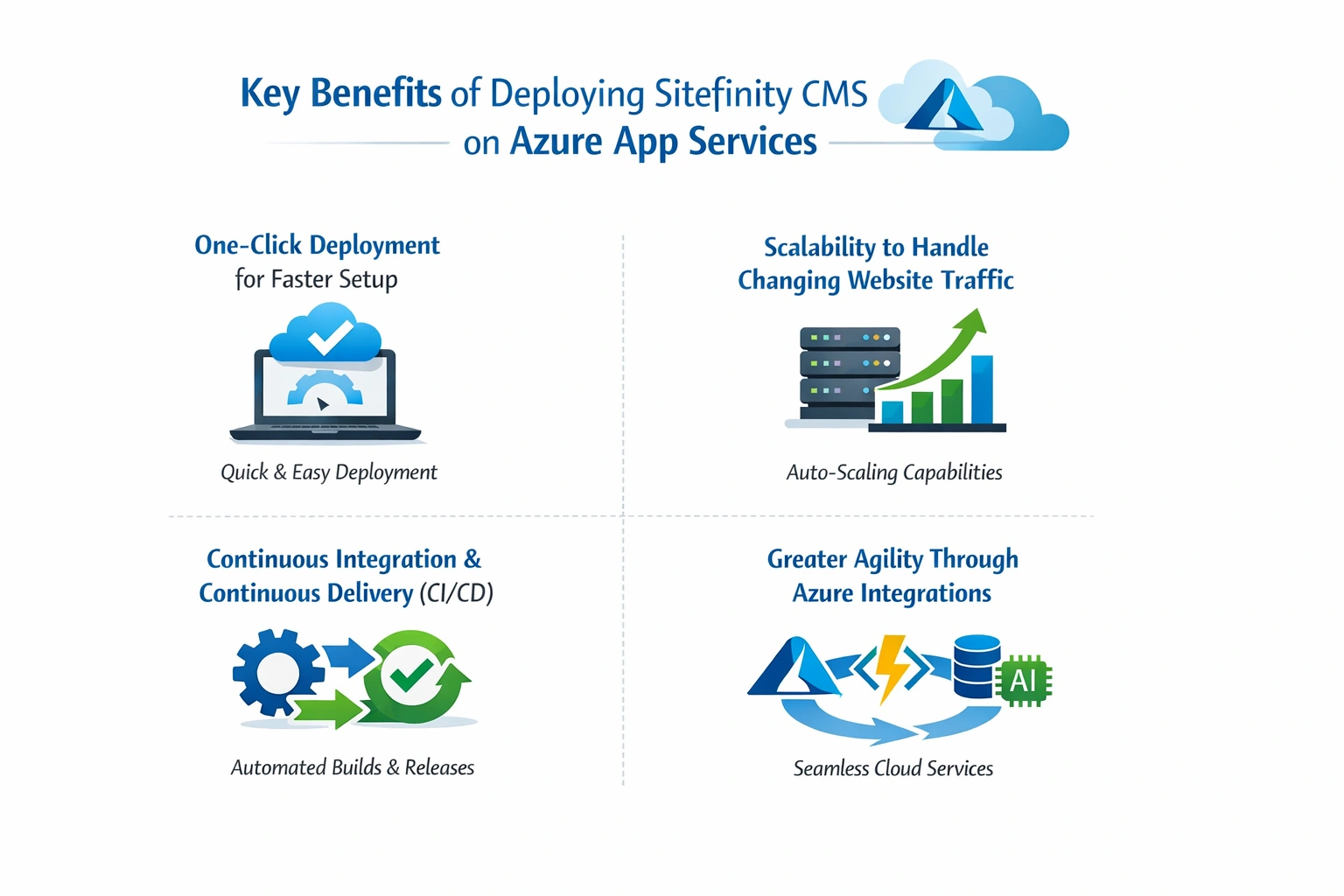
Below are some of the most important advantages businesses experience when running Sitefinity CMS on Azure App Services.
1. One-Click Deployment for Faster Setup
One of the biggest advantages of Azure is the ability to deploy applications quickly. With Azure cloud deployment, Sitefinity developers can avoid the complexity of traditional on-premise setup. Instead of configuring multiple servers and environments manually, administrators can launch deployments through the Azure portal or Azure Marketplace.
The process typically starts by creating an account within the Azure portal. Once configured, developers can deploy the Sitefinity project using automated tools and deployment pipelines.
This one-click deployment approach reduces setup time and allows development teams to focus on building website features rather than managing infrastructure.
2. Scalability to Handle Changing Website Traffic
Modern websites often experience sudden traffic increases during marketing campaigns, product launches, or seasonal activity. Running Sitefinity CMS on Azure allows businesses to handle both low and high traffic levels efficiently.
Azure supports both horizontal scaling and vertical scaling:
- Horizontal scaling increases the number of application instances
- Vertical scaling increases the computing power of existing servers
Azure also offers auto-scaling capabilities, which automatically adjust resources based on real-time traffic demand. This flexibility ensures high availability while also helping businesses control operational costs. Organisations only pay for the computing resources they actually use.
3. Continuous Integration and Continuous Delivery (CI/CD)
Modern digital platforms require faster release cycles and reliable deployment processes. Sitefinity CMS integrates well with Azure DevOps and continuous delivery pipelines. Once developers connect the project repository, Azure can automatically manage deployment workflows. The system can create staging environments, testing environments, and production deployments without manual intervention.
This automated process improves development efficiency and reduces the risk of deployment errors.
4. Greater Agility Through Azure Integrations
Another important benefit of deploying Sitefinity CMS on Azure is the access to the wider Microsoft ecosystem. Azure provides several built-in integrations that improve website performance, security, and identity management.
These sitefinity integrations may include services such as:
- Azure Active Directory
- Azure Redis Cache
- Azure Cognitive Search
- Azure AD B2B collaboration
Because Sitefinity is fully compatible with Microsoft technologies, organisations can use these services to build more advanced and scalable digital platforms. Many organisations already run their Sitefinity CMS websites on Azure, taking advantage of these integrations to improve development workflows and digital experience delivery.
Conclusion
Deploying Sitefinity CMS on Azure provides businesses with a modern and scalable cloud environment for managing digital platforms. Azure simplifies website hosting while delivering strong performance, security, and reliability. With Azure App Services, organisations can deploy Sitefinity websites faster without managing complex infrastructure. Features such as auto-scaling, built-in monitoring, and high availability help maintain consistent performance even during periods of high traffic.
In addition, Azure offers enterprise-level security and compliance capabilities. Standards such as ISO and HIPAA compliance make the platform suitable for industries that require strict data protection and regulatory adherence.
As more organisations adopt cloud-first strategies, Azure hosting for Sitefinity CMS continues to provide a reliable foundation for building scalable, high-performing digital experiences. If your organisation is planning to deploy, migrate, or optimise Sitefinity CMS on Azure, working with experienced developers can help ensure the best results. The team at IDS Logic offers specialised Sitefinity CMS development and Azure deployment services tailored to business requirements.
Explore our Sitefinity Development Services to learn how we can help you build and optimise scalable Sitefinity solutions on Azure.