The first reaction many teams have when discussing a CMS upgrade is concern. They anticipate a long, complex process, consuming time and resources, and providing little relief until the end. But is this assumption always true?
Not quite. A well-planned upgrade does not have to be stressful. In fact, when you follow Sitefinity CMS upgrade best practices, the process becomes structured, predictable, and far easier to manage.
Whenever Progress Sitefinity releases a new version, there are many improvements and bug fixes included in the update. These improvements include bug fixes, performance improvements, new features, and important security enhancements. Businesses that delay upgrading will often lose out on these benefits and expose themselves to avoidable risks.
That is why understanding how upgrades really work is the first step to upgrading with confidence.
Sitefinity CMS Upgrade – Quick Summary
Average upgrade timeline: 3 days to 3 weeks (depends on customisation)
Key benefits: Better security, faster performance, modern features
Risk level: Low with proper planning
Recommended approach: Staging → Testing → Production
If your Sitefinity CMS feels slow, hard to manage, or outdated, an upgrade is usually the fastest way to improve stability and user experience without rebuilding your website.
Understanding the Reality of the Sitefinity Upgrade Process
Many organisations believe a Sitefinity upgrade is just about uploading a new licence. This is one of the biggest misconceptions around CMS updates.
Each step of the Sitefinity upgrade process has a crucial role to play in maintaining the website’s stability and security. It includes updating core libraries, reviewing database changes, adjusting configurations, and validating integrations.
The good news is that this process does not need to be disruptive. With the right planning, you can upgrade Sitefinity CMS safely and avoid downtime or data issues.
Following a clear Sitefinity CMS upgrade checklist helps teams prepare properly. It ensures backups are ready, risks are identified early, and testing happens before launch.
Sitefinity security upgrades are critical for UK businesses to maintain security expectations and user behavior. A timely Sitefinity security upgrade ensures that businesses are protected from known threats and that trust is maintained.
In simple terms, upgrading is not about fixing something broken. It is about unlocking value you already pay for and keeping your CMS future-ready.
We will be breaking down the best practices for Sitefinity CMS upgrades in this guide. Each step is designed to make the upgrade process easier, without unnecessary complexity or surprises. Continue reading to learn more.
Common Sitefinity CMS Upgrade Mistakes to Avoid
Many businesses face problems during upgrades not because of the platform, but due to poor planning. Here are the most common mistakes:
- Skipping a staging environment
- Not reviewing Sitefinity release notes
- Ignoring custom module compatibility
- Forgetting rollback and recovery planning
- Launching without full QA testing
- Overlooking post-upgrade optimisation
Avoiding these mistakes helps reduce downtime, protects data, and ensures a smoother Sitefinity CMS upgrade process.
Sitefinity CMS Upgrade Best Practices: How to Prepare and Upgrade with Confidence
Upgrading your CMS should add value, not stress. When done properly, a Sitefinity upgrade improves security, unlocks new features, and keeps your website future-ready. That is why following Sitefinity CMS upgrade best practices matters for UK organisations of every size.
To fix bugs, strengthen security, and improve usability, Progress Sitefinity releases regular updates. If you skip versions, you also miss important improvements. This section describes how to prepare properly and follow a safe, structured upgrade approach, without surprises.
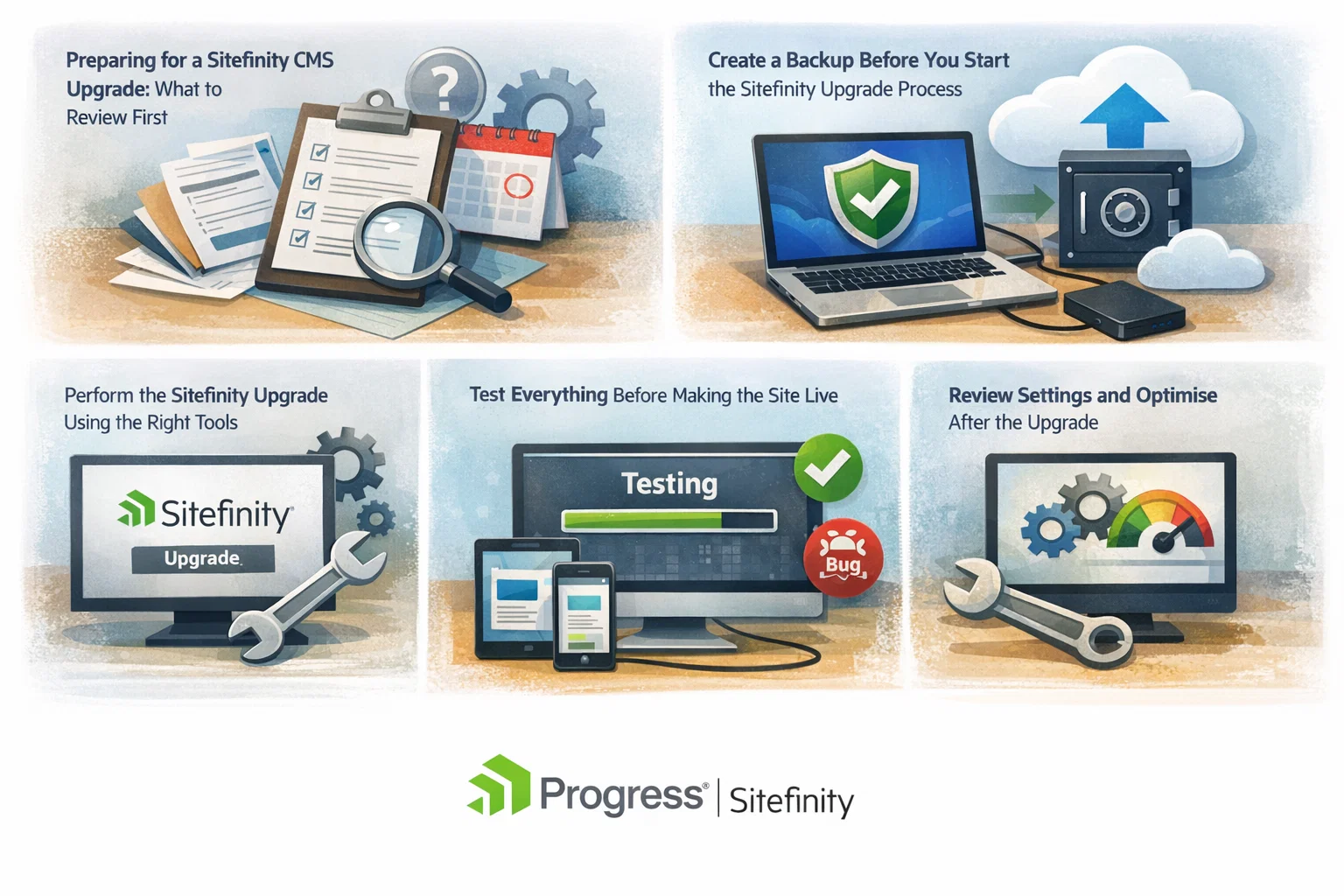
1) Preparing for a Sitefinity CMS Upgrade: What to Review First
No two websites are the same. Most Sitefinity websites include custom code, tailored workflows, and third-party tools. This is why preparation is the most important step in the Sitefinity upgrade process.
New Sitefinity versions often introduce API changes. In past releases, updates affected areas such as MVC structure, authentication, workflows, and content editing. Any custom work linked to these areas may need updates.
Sitefinity does not automatically update custom code. When you upgrade, changes from all intermediate versions also apply. Reviewing release notes early helps teams understand what needs attention.
It is also important to check platform compatibility. During a Sitefinity upgrade, you may need to update the Microsoft .NET framework to match the supported version listed in the documentation.
This early review step helps you upgrade Sitefinity CMS safely and avoid unexpected rework later. Many businesses rely on expert Sitefinity development services to assess custom features and reduce risk at this stage.
2) Create a Backup Before You Start the Sitefinity Upgrade Process
Backups are not optional. They are essential. Before upgrading, take full backups of your website files, database, and content. This protects your business if anything unexpected happens during the upgrade.
With a reliable backup, you can restore your site quickly and avoid data loss. This step alone can save hours of recovery work and prevent serious disruption. A solid backup plan is always a core part of any Sitefinity CMS upgrade checklist.
3) Perform the Sitefinity Upgrade Using the Right Tools
Modern Sitefinity versions, including 15.3, focus heavily on productivity and AI-assisted content management, which we cover in our Sitefinity 15.3 feature breakdown.
Once preparation is complete, the upgrade itself becomes far more manageable.
Sitefinity provides detailed documentation and knowledge base articles to guide the process. These resources address common issues and known errors.
If your project does not use NuGet packages, the Sitefinity Project Manager tool can help. It supports a guided upgrade process that:
- Updates web references
- Applies new libraries
- Adjusts configuration files
It is important to follow documented steps to reduce risk and maintain control during an upgrade.
4) Test Everything Before Making the Site Live
Testing is where many upgrades succeed or fail.
Before launch, test all modules, widgets, custom features, and user journeys. Check forms, navigation, content display, and integrations across devices and browsers.
It also helps to compare performance before and after the upgrade. Many teams see faster load times and smoother behaviour after applying updates.
Some older modules may no longer support the new version. Identifying these early prevents issues after launch.
Thorough testing ensures your upgrade delivers real improvements, not new problems.
5) Review Settings and Optimise After the Upgrade
Upgrades can reset or change certain configurations.
After upgrading, review permissions, workflows, and system settings. Confirm that everything matches your intended setup.
This step also creates an opportunity to remove unused features and outdated code. Cleaning up improves stability and simplifies future upgrades.
Ongoing monitoring and updates are easier with structured Sitefinity support and maintenance, especially for growing websites.
Read more: Top Reasons to Update Sitefinity Website to the Latest Version
What Happens If You Delay Your Sitefinity CMS Upgrade?
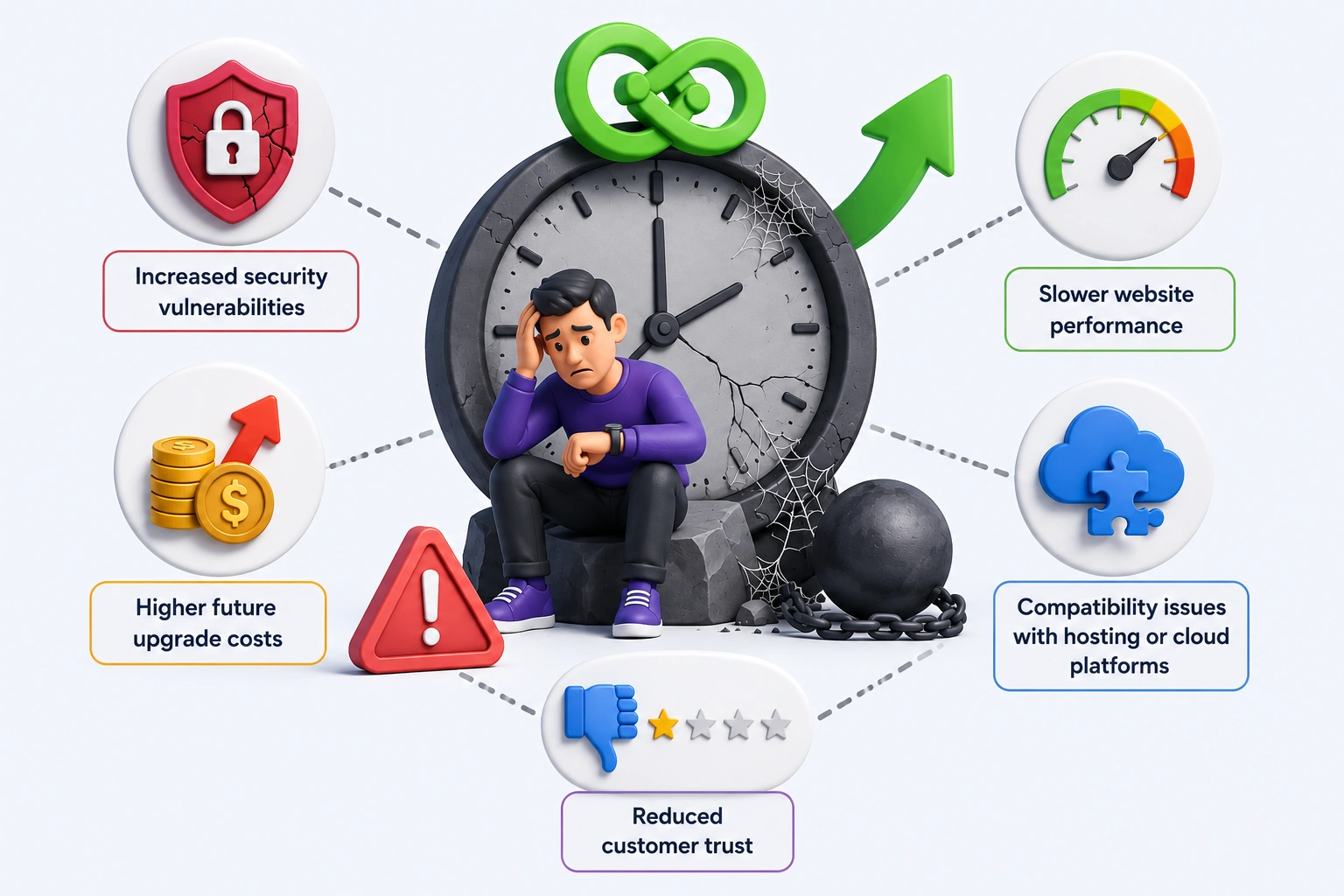
Postponing upgrades may seem harmless, but it often leads to:
- Increased security vulnerabilities
- Higher future upgrade costs
- Slower website performance
- Compatibility issues with hosting or cloud platforms
- Reduced customer trust
Regular upgrades keep your CMS aligned with modern infrastructure and prevent technical debt from building up.
Is it worth following Sitefinity CMS upgrade best practices?
Planned upgrades protect your website, your users, and your budget. By preparing early, backing up data, testing thoroughly, and reviewing settings, UK businesses can upgrade without disruption. Sitefinity CMS best practices help teams reduce long-term risk and maximize its value.
Upgrading is not just a technical task. It is an investment in security, performance, and future growth.
Should You Upgrade Sitefinity In-House or With Experts?
| In-House Upgrade | Expert-Led Upgrade |
|---|---|
| Limited Sitefinity experience | Dedicated Sitefinity specialists |
| Higher risk of errors | Structured, tested process |
| Longer timelines | Faster deployment |
| Reactive fixes | Proactive optimisation |
Working with experienced professionals ensures your Sitefinity CMS upgrade follows proven best practices and delivers measurable business value.
Many UK organisations choose partners like IDS Logic to safely upgrade projects built on Progress Sitefinity.
How IDS Logic Helps You Upgrade Sitefinity CMS with Confidence?
Upgrading a CMS can feel risky without the right support. Many UK businesses worry about downtime, data loss, or unexpected costs. This is where working with the right partner makes a real difference.
At IDS Logic, we help organisations follow proven Sitefinity CMS upgrade best practices without disruption. Our focus is simple: reduce risk, protect performance, and deliver a smooth upgrade experience.
We start by understanding your current setup. This includes reviewing your Sitefinity version, custom features, and integrations. From there, we define a clear Sitefinity upgrade process that fits your business goals and timelines.
Our team helps you upgrade Sitefinity CMS safely by using a structured Sitefinity CMS upgrade checklist. This covers backups, testing, security checks, and post-upgrade validation. Nothing is rushed, and nothing is missed.
Security is always a priority. Every Sitefinity security upgrade we manage focuses on protecting data, users, and admin access. This approach helps UK businesses stay compliant and maintain customer trust.
Beyond the technical work, we also support long-term success. We modernise custom features where needed and ensure your website stays scalable and flexible.
UK businesses choose IDS Logic because we focus on outcomes, not shortcuts.
We help organisations:
- Reduce risks during a Sitefinity security upgrade
- Improve site speed and stability after upgrading
- Remove outdated code and unsupported features
- Prepare teams for changes with minimal disruption
Our structured approach ensures your CMS upgrade delivers long-term value, not just a newer version number.
For customised solutions, our Sitefinity development services support enhancements alongside upgrades.
For long-term stability, our Sitefinity maintenance and support services keep your platform secure and up to date.
IDS Logic helps you turn a complex CMS upgrade into a predictable and stress-free process. If you’re planning a Sitefinity upgrade, we’re ready to help you move forward with confidence.
Conclusion – Making Sitefinity CMS Upgrades Simple and Risk-Free
When you follow Sitefinity CMS upgrade best practices, the process becomes clear, controlled, and predictable. Upgrading your CMS doesn’t need to be disruptive or complex. With a well-planned upgrade, you can stay secure, improve performance, and take advantage of new Sitefinity releases. Also, it protects your website from the growing risks associated with outdated systems.
The key to Sitefinity success for UK businesses is preparation. With the right checklist, testing process, and expert support, upgrading Sitefinity becomes a smart investment rather than a technical burden. Now is the time to upgrade your Sitefinity version to support long-term growth and stability.