Key Takeaways:
- Plan before you build. A successful SharePoint intranet starts with clear business goals, user research, and a well-defined information architecture - not just great design.
- Focus on employee experience. Simple navigation, personalised content, responsive layouts, and seamless Microsoft 365 integration encourage long-term adoption.
- Build for growth. A modern SharePoint intranet can scale with your organisation, supporting new departments, workflows, integrations, and business requirements over time.
- Governance is essential. Clear ownership, role-based permissions, security policies, and regular content reviews keep your intranet organised, compliant, and secure.
- Optimisation never stops. Monitor analytics, refresh content, improve search, and gather employee feedback to ensure your intranet continues to deliver value.
- Choose the right development partner. Experienced SharePoint specialists help you build a secure, scalable, and future-ready digital workplace while avoiding costly implementation mistakes.
A modern intranet has become much more than a place to store documents. It is the digital workspace where your employees collaborate, share knowledge, access business applications, and stay connected, whether they work in the office, remotely, or across multiple locations. As organisations continue to embrace Microsoft 365, SharePoint intranet development has become one of the most effective ways to create secure, scalable, and user-friendly digital workplaces.
Today’s SharePoint portal solutions bring people, information, and business processes together in one central platform. From employee self-service portals and department workspaces to knowledge hubs and project collaboration sites, SharePoint helps organisations simplify everyday work while improving communication and productivity. Its flexibility also allows businesses to build custom web portal development solutions that reflect their workflows, branding, and long-term goals.
Choosing SharePoint is only the first step. Long-term success depends on careful planning, intuitive design, effective governance, and continuous optimisation. A well-designed SharePoint intranet portal should be easy to navigate, integrate seamlessly with Microsoft 365 applications, and evolve alongside your organisation.
In this guide, you’ll learn why businesses continue to invest in SharePoint intranet development services, the essential web portal features every modern organisation should consider, and the best practices for creating a secure, engaging, and future-ready digital workplace.

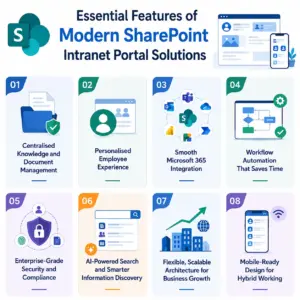
Essential Features of Modern SharePoint Intranet Portal Solutions
Successful intranet portal development is about much more than creating pages and document libraries. The best SharePoint intranet portal brings together people, business applications, knowledge, and everyday workflows into one connected digital workplace. These are the web portal features that deliver the biggest impact for UK organisations and help employees work more efficiently.
Below are the web portal features that make a modern SharePoint intranet portal a valuable long-term investment for organisations.
1. Centralised Knowledge and Document Management
Finding the right information should never slow your teams down. SharePoint gives you a secure, central location to store documents, policies, training materials, and business knowledge. Features such as version control, metadata, document libraries, and intelligent search keep content organised and easy to find. As your business grows, your intranet grows with it, without creating unnecessary complexity or duplicate content.
2. Personalised Employee Experience
Every employee needs quick access to different information. Modern SharePoint portals allow you to personalise content based on departments, locations, roles, or permissions. HR teams can publish company policies and benefits, while sales teams can access proposals, resources, and performance dashboards from the same platform. A personalised experience makes the intranet more relevant and encourages employees to use it every day.
3. Smooth Microsoft 365 Integration
One of the biggest advantages of SharePoint intranet development services is seamless integration with the Microsoft 365 ecosystem. Employees can move between SharePoint, Microsoft Teams, Outlook, OneDrive, Power BI, Planner, and Power Automate without switching between disconnected systems. This connected experience reduces manual work, improves collaboration, and helps teams stay focused throughout the day.
4. Workflow Automation That Saves Time
Modern intranets should do more than share information. They should simplify everyday work. With Power Automate and Power Apps, your SharePoint portal can automate approval requests, employee onboarding, leave management, document reviews, expense submissions, and many other repetitive business processes. This reduces manual effort, improves accuracy, and allows employees to spend more time on meaningful work.
5. Enterprise-Grade Security and Compliance
Security remains a priority for every organisation. SharePoint provides built-in security controls that help protect business information while supporting compliance requirements. Role-based permissions, multi-factor authentication, Microsoft Purview integration, sensitivity labels, and audit logs help ensure that only authorised users can access sensitive information. This is especially valuable for organisations operating under GDPR and other industry regulations.
6. AI-Powered Search and Smarter Information Discovery
Employees should not waste time searching through multiple folders or outdated documents. Modern SharePoint uses intelligent search capabilities to surface relevant documents, people, news, and resources more quickly. As organisations continue adopting Microsoft Copilot and AI-powered workplace tools, a well-structured SharePoint intranet also provides a stronger foundation for delivering accurate and context-aware results.
7. Flexible, Scalable Architecture for Business Growth
Your digital workplace should support your organisation today and continue supporting it as your needs evolve. Whether you are building a simple employee portal or a complex intranet portal development project spanning multiple departments and locations, SharePoint offers the flexibility to scale without affecting performance. Hub Sites, Communication Sites, and modern site collections allow organisations to expand while maintaining consistent navigation and governance.
8. Mobile-Ready Design for Hybrid Working
Today’s workforce expects access from anywhere. Modern SharePoint sites automatically adapt to desktops, tablets, and smartphones, giving employees a consistent experience whether they are in the office, working remotely, or travelling. A responsive design improves accessibility, supports hybrid working, and helps employees stay connected wherever business takes them.
Why These Features Matter:
When these capabilities work together, SharePoint becomes much more than a document management platform. It creates a connected digital workplace where employees can find information faster, collaborate more effectively, automate repetitive tasks, and stay productive wherever they work. Investing in the right SharePoint intranet development services ensures these features are configured to deliver measurable business value rather than simply adding more technology.
Advanced SharePoint Capabilities That Future-Proof Your Digital Workplace
Building a successful SharePoint intranet portal is not just about launching a website. The real value comes from using the advanced capabilities that improve collaboration, strengthen governance, and create a better employee experience. Modern SharePoint portal solutions continue to evolve with Microsoft 365, giving organisations more intelligent ways to manage content, support hybrid teams, and prepare for AI-powered workplaces.
1. Communication Sites for Better Internal Engagement
Keeping employees informed becomes much easier when communication happens from one trusted location. SharePoint Communication Sites allow organisations to publish company news, leadership updates, policies, announcements, and business resources through attractive, mobile-friendly pages. Unlike traditional intranets, Communication Sites are designed to improve engagement while making content easier to publish and maintain.
2. Hub Sites That Connect Departments
As organisations grow, information often becomes scattered across multiple sites. SharePoint Hub Sites solve this by bringing related department and project sites together under a single structure. Shared navigation, consistent branding, centralised search, and unified content make it much easier for employees to move between departments without losing context. This creates a more connected digital workplace and improves the overall user experience.
3. Intelligent Web Portal Components
A modern intranet should do more than display information. It should help employees complete everyday tasks quickly. With configurable web portal components, organisations can build personalised dashboards using features such as:
- Company news and announcements
- Document libraries
- Quick Links
- Events and calendars
- Employee directory
- Power BI dashboards
- Forms and business applications
These components allow organisations to expand their SharePoint website development projects without rebuilding the entire portal.
4. AI-Ready Content and Smarter Search
Finding information quickly has become even more important as organisations adopt AI across Microsoft 365. Modern SharePoint improves search by using Microsoft Search and well-structured content to surface relevant documents, people, and resources faster. A properly organised intranet also provides a stronger foundation for Microsoft 365 Copilot, helping users receive more accurate and context-aware responses while reducing time spent searching for information.
5. Built-In Governance and Content Management
A successful intranet is not only easy to use, it is also easy to manage. SharePoint today includes advanced governance capabilities that help organisations monitor permissions, manage site lifecycles, reduce oversharing, and maintain content quality. These controls become increasingly important for businesses preparing their Microsoft 365 environments for AI-powered experiences and long-term compliance.
6. Smooth Collaboration Across Microsoft 365
Your intranet becomes significantly more valuable when it connects with the tools employees already use every day. SharePoint integrates seamlessly with Microsoft Teams, Outlook, OneDrive, Power BI, Power Apps, and Power Automate. Employees can collaborate on documents, manage projects, automate workflows, and access business information without constantly switching between different applications. This connected experience reduces friction and helps teams work more efficiently, whether they are in the office or working remotely.
7. Microsoft Viva Connections for a Better Employee Experience
Microsoft Viva Connections brings your SharePoint intranet directly into Microsoft Teams, giving employees a single place to access company news, business applications, resources, and personalised content without leaving their everyday workspace. This integration helps improve engagement, strengthens internal communication, and makes the intranet easier to access for hybrid and remote teams.
Why Do Businesses Continue to Choose SharePoint for Intranet Development?
Choosing the right intranet platform is a long-term business decision. While many solutions offer document sharing and internal communication features, SharePoint stands apart because it combines collaboration, content management, automation, security, and Microsoft 365 integration within a single platform.
Unlike standalone intranet products, SharePoint intranet development allows organisations to build a digital workplace that grows alongside their business. Whether you are supporting a small team or thousands of employees across multiple locations, SharePoint provides the flexibility to create secure, scalable, and highly customised environments without replacing your existing Microsoft ecosystem.
Businesses continue to choose SharePoint portal solutions because they offer:
- Native integration with Microsoft Teams, Outlook, OneDrive, Power BI, Power Apps, and Power Automate.
- Enterprise-grade security with Microsoft Entra ID, Microsoft Purview, and compliance controls.
- Flexible architecture that supports departmental sites, communication sites, Hub Sites, and enterprise portals.
- AI-ready content management that enhances Microsoft 365 Copilot experiences.
- Continuous Microsoft updates without major infrastructure upgrades.
- Extensive customisation through SPFx, APIs, and low-code development tools.
For organisations already using Microsoft 365, SharePoint provides a cost-effective foundation for building a modern SharePoint intranet portal while reducing the complexity of managing multiple disconnected workplace tools.
How to Plan and Build a Successful SharePoint Intranet
Building a successful SharePoint intranet portal is about much more than choosing a design or adding web parts. The most effective intranets solve real business challenges, improve employee experiences, and evolve as your organisation grows. A clear strategy from the beginning helps you avoid costly changes later while creating a digital workplace that employees genuinely use.
Follow these proven steps to plan and deliver a successful SharePoint intranet development project.
1. Define Business Goals Before You Build
Every successful intranet starts with a clear purpose. Before creating pages or selecting features, identify the problems your portal should solve. It could be improving internal communication, simplifying document management, supporting hybrid teams, or reducing manual processes.
Ask questions such as:
- What business challenges should the intranet solve?
- Who will use it every day?
- Which departments need dedicated workspaces?
- What outcomes will define success?
Clear objectives help shape every decision that follows and ensure your SharePoint portal solution delivers measurable value instead of becoming another document repository.
2. Understand Your Users and Prioritise Their Needs
An intranet succeeds when it is designed around the people who use it, not the teams that manage it. Speak with employees across different departments to understand how they work, what information they search for most often, and which tasks take longer than they should. This feedback helps you prioritise the features that will make the biggest difference from day one.
When employees help shape the portal, adoption is usually much higher after launch.
3. Create a Clear Information Architecture
Employees should be able to find information in just a few clicks. Organise your intranet using logical navigation, Communication Sites, Hub Sites, document libraries, metadata, and consistent naming conventions. A well-planned information architecture improves search, reduces duplicate content, and makes the portal easier to maintain as it grows. Simple navigation almost always outperforms complex menu structures.
4. Design Around Everyday Employee Tasks
Your homepage should help employees complete common tasks quickly rather than overwhelm them with information. Focus on the content people access most often, including company news, HR resources, project updates, policies, quick links, and frequently used business applications. Responsive layouts and accessible design ensure employees enjoy the same experience across desktops, tablets, and mobile devices. A successful SharePoint intranet portal becomes the starting point for the working day, not simply another website.
5. Build Collaboration Into the Experience
The best SharePoint portal solutions bring communication, collaboration, and business processes together in one place. Connect your intranet with Microsoft Teams, OneDrive, Planner, Power BI, Power Apps, and Power Automate so employees can share documents, manage projects, complete approvals, and access business data without switching between multiple systems. A connected workplace helps teams work faster while reducing unnecessary manual effort.
6. Establish Governance and Security Early
Governance should never be an afterthought. Define who owns each site, who can publish content, how permissions will be managed, and how information will be reviewed over time. Combine this with role-based access, Microsoft Entra ID authentication, multi-factor authentication, and compliance policies to protect sensitive business information. Strong governance keeps your intranet organised, secure, and easier to manage as your organisation expands.
7. Launch a Pilot Before Rolling It Out Organisation-Wide
Avoid launching everything at once. Start with one department or business function, collect feedback, monitor how employees use the portal, and make improvements before expanding across the organisation. This phased approach reduces risk, improves adoption, and helps you identify opportunities for further optimisation before a full rollout.
8. Measure, Improve, and Keep Your Intranet Relevant
Launching your intranet is only the beginning. Use SharePoint analytics to understand how employees interact with the portal, which pages receive the most engagement, and where users struggle to find information. Regularly update content, review navigation, gather employee feedback, and introduce new features as business needs change.
SharePoint Intranet Design and Optimisation Best Practices
A successful SharePoint intranet needs regular care after launch. Content becomes outdated, permissions change, and employee needs evolve. Without clear ownership, even a well-designed portal can quickly become cluttered and difficult to trust. These practical steps will help you keep your SharePoint intranet portal useful, secure, and easy to manage.
1. Give Every Section a Clear Owner
Assign named content owners across HR, IT, Finance, Marketing, and other key departments. Each owner should know what they manage and when they must review it.
Set review dates for:
- Company policies
- Department pages
- Forms and guidance
- Frequently asked questions
- News and announcements
- Training resources
Microsoft recommends clear intranet roles because site owners and content authors remain responsible for permissions, content quality, audits, and ongoing management.
Remove duplicate pages and archive content that no longer serves a purpose. Employees will stop trusting your portal when they repeatedly find outdated information.
2. Use Analytics to Guide Improvements
Do not rely on assumptions when deciding what to improve. Review SharePoint and Microsoft 365 usage reports to understand how people use your portal.
Useful indicators include:
- Site visits and active users
- Frequently accessed pages and files
- File activity and sharing patterns
- Storage growth
- Usage trends across sites
- Content receiving little engagement
Microsoft 365 reports can show SharePoint activity, file use, sharing, storage, and site-level trends across different periods.
Use these insights to simplify navigation, improve popular pages, and remove content that adds little value. Good SharePoint intranet design and optimisation should always respond to real user behaviour.
3. Improve Search Through Better Content Structure
Search quality depends heavily on how you organise and describe your content.
Use clear page titles, consistent file names, useful metadata, and logical content categories. Avoid uploading several versions of the same document under slightly different names.
You should also review:
- Content types
- Metadata fields
- Navigation labels
- Hub associations
- Document naming rules
- Page descriptions
A clear information architecture helps employees browse and search more effectively. It also makes a growing SharePoint intranet portal easier to govern.
4. Make Adoption Part of Everyday Work
Employees rarely adopt a portal simply because it has launched. They need to understand what it offers and how it helps them.
Keep training brief and practical. You could share:
- Two-minute walkthrough videos
- Quick tips inside Microsoft Teams
- Short departmental demonstrations
- Guides for common tasks
- Examples of time saved through the portal
- Updates when new features go live
You can also pin key intranet pages within Teams and place useful links where employees already work. This makes the portal easier to discover and reduces the need to remember another destination.
5. Review Navigation and User Experience Regularly
Business structures change. New departments appear, services expand, and employee priorities shift. Your navigation should change with them.
Test common tasks with real users. Ask them to find a policy, submit a request, locate a colleague, or access a department page. Their behaviour will reveal problems that analytics may not show.
Review your web portal components, including:
- Homepage links
- Menus and hub navigation
- Department landing pages
- Search filters
- Calls to action
- Mobile layouts
- Forms and dashboards
Small improvements often make a bigger difference than a full redesign. Keep pages focused, reduce unnecessary web parts, and place important actions where users expect them.
6. Audit Permissions and External Sharing
Permissions often become complicated as sites, teams, and projects grow. Review access regularly rather than waiting for a security issue.
Check for:
- Users who no longer need access
- Old guest accounts
- Sites shared too widely
- Broken permission inheritance
- Sensitive files available through broad links
- Owners who have left the organisation
Microsoft provides data access governance reports that help administrators identify broad permissions, external guests, and potential oversharing across SharePoint and OneDrive.
Use Microsoft Entra ID, multi-factor authentication, conditional access, and appropriate sharing controls to strengthen protection. These measures also support UK organisations managing GDPR and internal data governance requirements.
7. Keep Content Ready for Microsoft 365 Copilot and Agents
AI tools can only work well with reliable information. Outdated files, duplicated pages, and excessive permissions can reduce the quality of results or expose content to unintended users.
Before expanding AI use, review:
- Content accuracy
- Document ownership
- Access permissions
- Sharing settings
- Duplicate information
- Obsolete sites and files
Microsoft advises organisations to keep SharePoint content current and well governed because Copilot and agents use Microsoft Graph while respecting existing permissions and sharing policies. Regular content governance now supports both intranet quality and AI readiness.
8. Treat Optimisation as an Ongoing Service
Your intranet should change as your organisation changes. Schedule quarterly reviews to assess content, search, security, navigation, and user feedback.
For larger environments, professional SharePoint intranet development services can support:
- Performance reviews
- Permission audits
- User-experience improvements
- Search optimisation
- Governance planning
- New integrations and workflows
- Ongoing support and maintenance
This ongoing approach turns basic intranet portal development into a sustainable digital workplace programme. It also helps your SharePoint portal solutions remain useful long after the initial launch.
Build a SharePoint Intranet That Delivers Long-Term Business Value
A successful SharePoint intranet development project is about far more than creating an internal website. It is about building a connected digital workplace where employees can collaborate, share knowledge, automate routine processes, and access the information they need without unnecessary delays.
SharePoint portal solutions today give organisations the flexibility to create secure, scalable, and user-friendly environments that evolve alongside the business. Whether you are planning a new SharePoint intranet portal, replacing an outdated system, or investing in custom web portal development, SharePoint provides the foundation to support long-term growth, stronger collaboration, and better employee experiences.
A strategically planned intranet does more than centralise information. It reduces the time employees spend searching for documents, shortens approval cycles through workflow automation, simplifies knowledge sharing, and supports faster decision-making across departments. Over time, these improvements create a more connected, productive, and efficient organisation.
The real difference, however, comes from how your intranet is planned, designed, and maintained. A well-structured portal with intuitive navigation, strong governance, seamless Microsoft 365 integration, and ongoing SharePoint intranet design and optimisation quickly becomes one of the most valuable business tools your organisation owns.
Choosing the right development partner helps you move beyond simply launching an intranet. It ensures you build a digital workplace that employees adopt, IT teams can manage with confidence, and your business can continue to expand for years to come.
Why Choose IDS Logic for SharePoint Intranet Development?
Building an effective intranet takes more than technical expertise. It requires a clear understanding of how people work, collaborate, and access information every day.
At IDS Logic, we deliver custom SharePoint intranet development services that help organisations create secure, scalable, and engaging digital workplaces. From strategy and planning through to development, migration, integration, and ongoing optimisation, our team works closely with you to ensure your SharePoint environment supports your business goals today and remains ready for tomorrow.
When you partner with IDS Logic, you benefit from:
- 18+ years of enterprise technology expertise
- 250+ successful SharePoint and Microsoft 365 projects delivered
- Experienced consultants focused on UK business requirements
- Expertise in modern intranet development, workflow automation, and Microsoft 365 integrations
- End-to-end services covering consulting, development, migration, support, and optimisation.
Our SharePoint specialists have delivered solutions for organisations across manufacturing, education, healthcare, retail, finance, logistics, and professional services, helping businesses modernise collaboration while meeting industry-specific security and compliance requirements.
Whether you are starting from scratch or modernising an existing portal, we help you build SharePoint portal solutions that improve collaboration, simplify business processes, and deliver measurable value across your organisation.
Ready to Transform Your Digital Workplace?
Whether you’re planning your first SharePoint intranet or modernising an existing environment, IDS Logic can help you build a secure, scalable, and future-ready solution tailored to your business. Speak with our SharePoint specialists today to discuss your requirements and discover how we can support every stage of your SharePoint journey.