Figma to WordPress transition is available to a number of companies. Here is everything about the process to offer a better understanding
The Figma to WordPress transition is now a common requirement for businesses and design teams. Figma helps create beautiful layouts, but design alone cannot drive traffic, leads, or sales. To make a real impact, those designs must turn into a fast, functional WordPress website.
A larger percentage of business websites around the world are powered by WordPress, which makes Figma to WordPress conversion a critical step in modern web development. Figma is used by more teams than ever before. Ensures accuracy, performance, and long-term flexibility when done correctly.
Many teams face a familiar challenge. They approve a polished Figma design with strong visual appeal, only to struggle when turning it into a working website. Manual coding feels slow and frustrating. Design details get lost. Performance suffers. This gap between design and development often delays launches and increases costs.
That gap does not need to exist. This guide explains the Figma to WordPress transition in a clear, practical way. It focuses on converting designs into clean HTML first, then integrating them into WordPress for better control and speed. The approach suits designers, developers, and businesses that want reliable results without unnecessary complexity.
By following the right process, you can keep the original design intact while building a WordPress site that is easy to manage, fast to load, and ready to scale.
How to Make the Figma to WordPress Transition Simple and Stress-Free?
You may already have a polished design ready in Figma. Yet, turning that design into a working WordPress website can feel overwhelming. Figma is powerful, but it focuses on design, not delivery. WordPress, on the other hand, is built for publishing, managing content, and driving results. This is why the Figma to WordPress transition matters.
Converting Figma designs into WordPress opens the door to flexibility, better performance, and long-term control. With the right approach, you can keep the original design intact while building a site that is easy to update and ready to scale. Many businesses also choose this route to unlock the full value of custom WordPress development, especially when speed, SEO, and usability matter.
Before diving into tools or techniques, it helps to understand why these two platforms work so well together.
Figma and WordPress – Two Powerful Tools That Work Best Together
Figma has become a favourite tool for designers who want freedom and precision. It allows teams to design layouts, test ideas, and collaborate in real time. Designers can work together from different locations, share feedback instantly, and refine every detail before development begins. This level of collaboration saves time and avoids confusion later.
Figma also supports interactive prototypes. Designers can map user journeys, test interactions, and validate ideas before a single line of code is written. This makes it perfect for planning how a website should look and feel. However, Figma stops at design. It does not create a live, usable website on its own.
That is where WordPress comes in. WordPress is one of the most widely used content management systems in the world. It is simple enough for beginners, yet flexible enough for complex business websites. With WordPress, you can manage content, update pages, add features, and optimise for search engines without ongoing technical help. This makes it a practical choice for businesses that want control and long-term growth.
When it comes to Figma to WordPress conversion, many people find the process challenging at first. Manual conversion often means rebuilding layouts, styles, and components from scratch. This can feel repetitive and time-consuming, especially when the design is already complete.
In the next section, we will discuss how you can simplify the transition from Figma to WordPress, reduce rework, protect design quality, and speed up delivery. Using the right approach, you can reduce the amount of rework, protect design quality, and speed up delivery.
Now Let’s Look at the Options to Consider
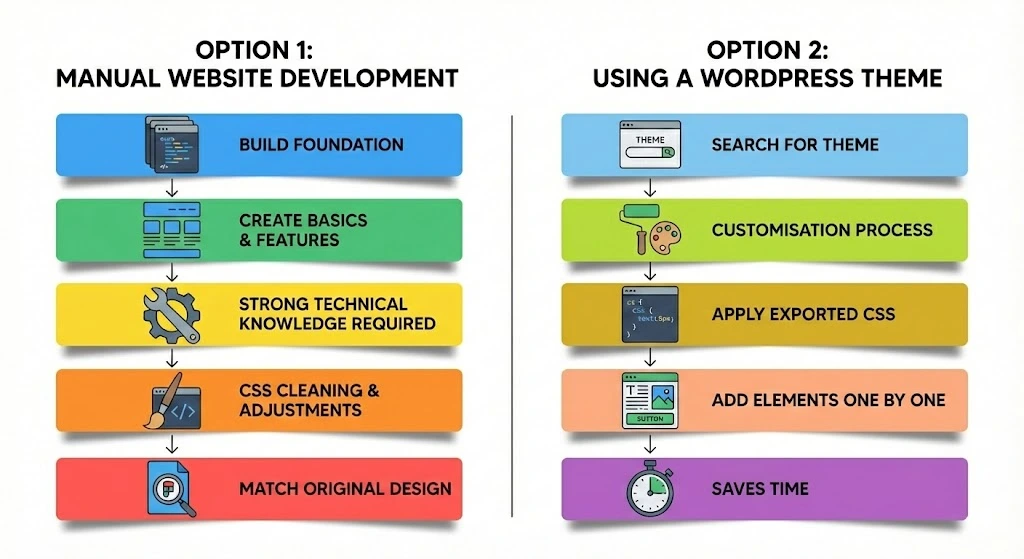
Option 1: Manual Website Development
The first option is full website development from scratch. This approach focuses on building the WordPress site manually using core web files and technologies.
To create the foundation of the website, you need files that handle structure and functionality, such as:
- PHP
- CSS
- JavaScript
Once these files are in place, the next step is to build the basics. This includes creating headers, footers, navigation menus, and features like the search bar. Each part needs to be connected correctly so the site works as a complete system.
Note: This method requires strong knowledge of PHP, HTML, CSS, and JavaScript. Although Figma allows you to export CSS, the exported code usually needs cleaning and adjustments. This makes the process more complex than it may appear.
After the structure is ready, images and design assets are exported from the Figma project and placed into the WordPress directory. These assets are then called where required across the site. At every stage, the output should be checked to ensure it matches the original Figma design.
Option 2: Using a WordPress Theme
This option involves working with a WordPress theme and requires patience and careful customisation.
The first step is to search for a WordPress theme that closely matches the look and feel of your Figma design. Once a suitable theme is selected, the customisation process begins.
A large part of this step involves working with CSS. Developers often copy exported CSS from Figma and apply it to the theme’s style.css file. The design is then compared repeatedly with the original layout to reduce visual differences.
Next, required elements and features are added one by one. This stage takes time, as each section must be placed correctly to maintain design consistency and usability.
Result: You get a customised WordPress theme that reflects your preferences. This approach saves time compared to full manual development and reduces the need to return to Figma repeatedly.
Pros and Cons of Different Figma to WordPress Conversion Methods
1. Choosing a Service Provider
Pros:
Delivers high-quality results tailored to specific business needs and brand value.
Cons:
This option can be costly and requires careful selection to ensure the provider fits your budget, timeline, and quality expectations.
2. Using Figma Plugins and AI Tools
Pros:
Advanced tools help generate WordPress code quickly from Figma designs, reducing manual effort.
Cons:
Customisation may be limited, and the final output may not fully match the original design. Security and plugin reliability must also be reviewed before use.
Read more: How to Implement : WordPress Guide to Malware Detection
3. Using a Page Builder for Figma to WordPress Conversion
Pros:
Page builders offer flexibility in layout creation and allow easy customisation without heavy coding.
Cons:
There is a learning curve, and the final site may not be as lightweight or optimised as a hand-coded solution.
4. Converting Figma to WordPress Using Premade Themes
Pros:
Premade themes allow fast setup and include built-in functionality that reduces development time.
Cons:
Design flexibility is limited, and the final result may not fully match the original Figma design. Theme selection must be done carefully.
5. The HTML-Based Figma to WordPress Conversion Process
Pros:
This method offers full control over design and functionality. Hand-coding HTML and CSS helps achieve pixel-perfect accuracy.
Cons:
It is time-consuming, requires coding expertise, and can lead to compatibility issues. Future updates may also require manual changes, increasing maintenance effort.
Read More: Everything about WordPress Maintenance Packages and Plans
Proven Tips to Simplify the Figma to WordPress Process
A successful Figma to WordPress transition starts well before development begins. Small preparation steps can save hours later and help avoid design mismatches or rebuilds.
Start by keeping your Figma files organised. Group related layers and label them clearly, such as headers, footers, buttons, and content sections. This structure makes it easier to understand the design when rebuilding it in WordPress and reduces confusion during handoff.
Next, use consistent naming across all layers and components. When names are clear and uniform, developers can quickly map design elements to WordPress blocks, templates, or theme files. This also helps when using plugins or page builders that rely on structured layouts.
If you are new to Figma, investing time in professional learning resources can make a real difference. Short online courses and guided tutorials help you understand layout logic, Auto Layout, and responsive design patterns. These skills directly improve the quality of your WordPress build.
It also helps to explore designs created by the wider Figma community. Community files often show best practices for layout structure, spacing, and responsiveness. Reviewing these designs gives you practical ideas that can improve your own workflow and speed up the conversion process.
Wrapping Up – Choosing the Right Figma to WordPress Approach
Converting a Figma design into a live WordPress site is not a one-size-fits-all task. Each method has its place, depending on your goals, timeline, and technical skills.
If speed is your top priority and the design is simple, plugins and automation tools can give you a quick starting point. When accuracy, flexibility, and long-term scalability matter more, manual rebuilding or custom wordpress theme development delivers stronger results. Page builders sit in between, offering visual control without heavy coding.
What matters most is choosing a method that protects design quality, keeps the site easy to manage, and supports performance and SEO. When done right, the transition from Figma to WordPress creates a site that looks good, loads fast, and grows with your business.
Get Expert Help for Figma to WordPress Development
Figma to WordPress conversion can become complex when designs are detailed, deadlines are tight, or performance expectations are high. This is where professional support makes a real difference.
IDS Logic with 18+ years of experience in this domain, helps businesses turn Figma designs into clean, responsive, and high-performing WordPress websites. The team focuses on maintaining design accuracy while ensuring the site remains fast, secure, and easy to manage.
With IDS Logic, you get:
- Pixel-accurate conversion that respects your original design
- Fully responsive layouts that work across all devices
- SEO-friendly structure built for long-term visibility
- Optimised code for faster load times
- Ongoing WordPress support and maintenance
Whether you need a custom theme, page builder-based site, or full WordPress development, IDS Logic ensures your Figma design becomes a reliable business-ready website.