Integrate Mautic with Drupal to simplify marketing automation. Track visitors, run smart campaigns, and boost conversions—affordably and effectively. Start with our step-by-step guide today!
Today’s increasing workloads are forcing companies to do more with less, without sacrificing quality or speed. Manual, repetitive tasks are quickly losing popularity in our fast-paced business world. Marketing automation can help, with tools like Mautic, you can simplify complex marketing processes, save time, and make smarter decisions.
From email campaigns to lead scoring to segmentation of users and campaign triggers, Mautic is a powerful, open-source marketing automation platform. In addition to reducing costs, improving customer experiences, and increasing efficiency, automation is obvious to businesses as they adopt it. It has been seen that companies using marketing automation gain an edge over their competitors, especially in connecting with their audiences.
This blog is your step-by-step guide to integrating Mautic with Drupal. Whether you want to track visitors, personalise outreach, or trigger campaigns based on user behaviour, we’ll show you how to get everything up and running smoothly and effectively.
What is Mautic?
Mautic is a flexible, open-source marketing automation platform. It helps you manage everything from email campaigns and lead nurturing to personalised content and customer journeys, without paying for expensive software licences.
And since it’s open source, you’re in full control. You can customise workflows, track users, and integrate it with your CMS of choice, like Drupal (a flexible, open-source content management system (CMS) used to build and manage websites).
Step-by-Step: How to Set Up and Integrate Mautic with Drupal
Combining Drupal (CMS) and Mautic (Marketing Automation Software) is an excellent choice for managing your omnichannel digital experiences. Many organisation already manage their content in Drupal. The benefits are obvious: saving time, avoiding manual errors, and ensuring a consistent experience for your end users.
Now, let’s break down exactly how to get them working side by side. From installing Mautic to tracking real visitor data, this guide will walk you through every step.
What You’ll Need for this Integration?
Before you get started, make sure you have the following:
- A working Drupal 10 (or 9.x) site
- A Mautic instance (cloud or self-hosted)
- The Mautic Integration module is installed on Drupal
- Access to your Mautic API credentials
Step 1) Install Mautic on Your Server
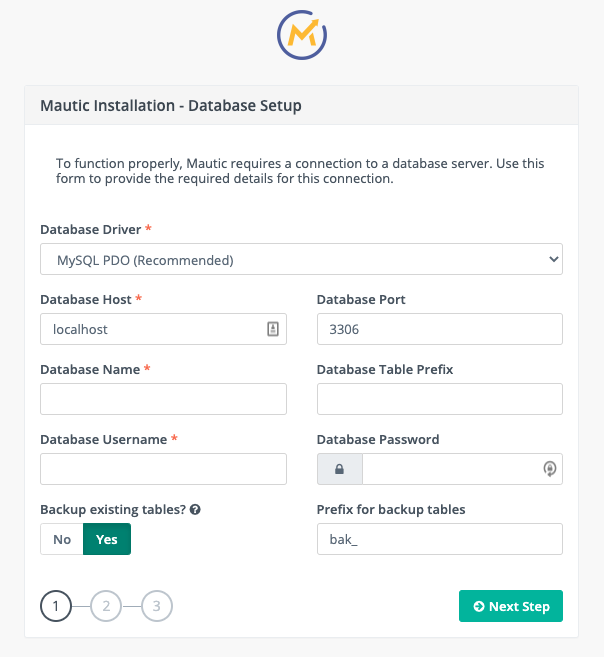
Before you start, make sure your server fulfills Mautic’s basic requirements (PHP, MySQL, etc.).
You can install Mautic using one of the following methods:
- Download the production package
- Clone it directly from GitHub
- Use Composer
Once downloaded:
- Upload the ZIP file to your hosting server.
- Extract the contents into your chosen directory (e.g.
/var/www/mautic). - Set the right file permissions.
Mautic will automatically check your environment. If all looks good, hit Next Steps to continue.
Now, when you see the setup screen, you’ll enter your database credentials. Follow the prompts to complete the setup. Once done, Mautic will be installed on your local or cloud server.
Step 2) Set Up the Directory Structure in Drupal
Before enabling Mautic in Drupal, you must first ensure that your modules are well-organised.
Here’s what to do:
- Download the official Mautic module for Drupal (for instance, version 8.x-1.11).
- Extract the zipped folder.
- Place the folder inside:
- bash
CopyEditserver_path/modules/mautic
This ensures Drupal knows the location of the Mautic integration files.
Step 3) Enable the Mautic Module in Drupal
Now that the module is in place, it’s time to activate it.
- Open your Drupal admin dashboard in your browser.
- Go to Manage → Extend.
- Find and tick the Mautic module from the list.
- Click Install.
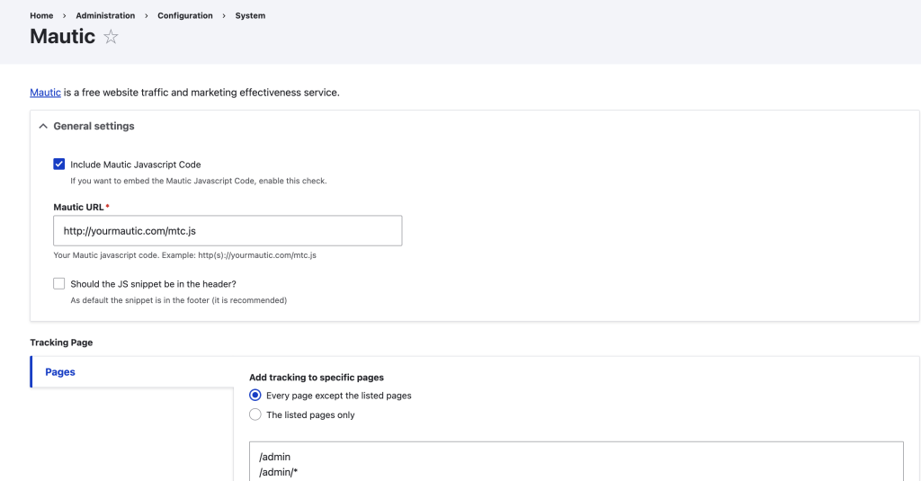
Once installed, go to:
CopyEdit/admin/config/system/mautic
You’ll see the configuration screen.
In the Mautic URL field, enter the full path to your tracking script (e.g. https://yourmautic.com/mtc.js)
Click Save configuration.
You should now see a success message confirming the connection.
Step 4) Embed a Mautic Form into Drupal
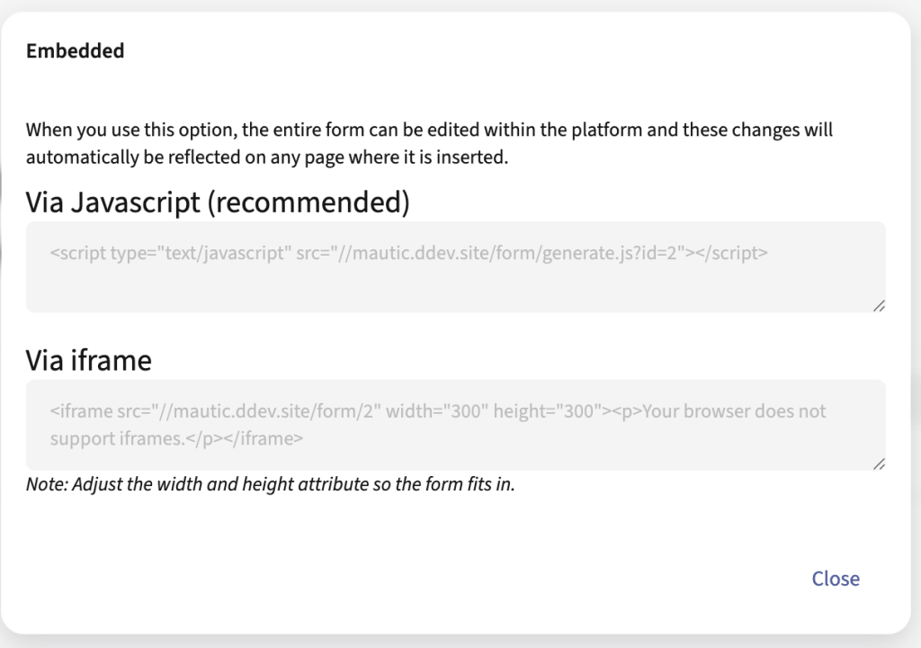
Below is the process for connecting your site visitors to Mautic’s CRM features:
- Log in to your Mautic dashboard.
- Go to Components → Forms.
- Select or create a form.
- Click Public URL / Embed
Mautic will generate a simple embed code like this:
html
CopyEdit
<script type="text/javascript" src="https://your-mautic-instance.com/form/generate.js?id=12"></script>
Copy this code.
Now, in your Drupal admin:
- Create a new block or page
- Ensure Full HTML is enabled for the text format
- Paste the script
- Your lead form is now live and ready to capture data.
Step 5) Start Tracking and Analysing Visitors
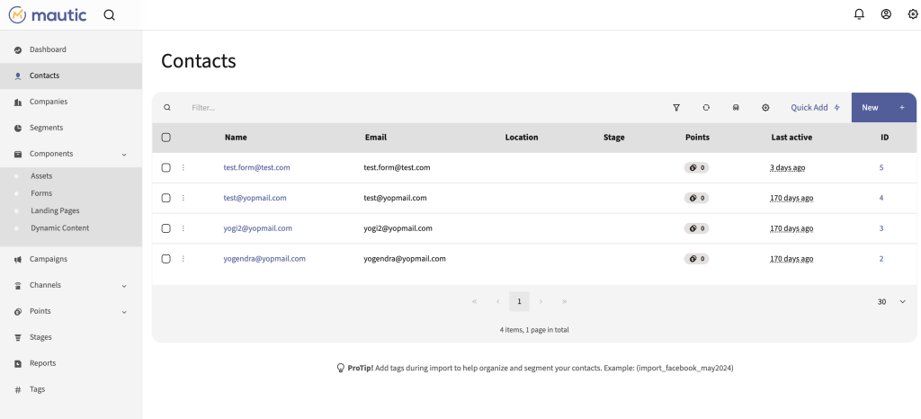
Once the form is active and Mautic tracking is enabled, you can begin monitoring user behaviour in real-time.
With Mautic CRM integration, you can:
- Track individual user sessions
- Record form submissions
- View full visitor journeys
- Segment users by behaviour, geography, or interests
Assign lead scores based on specific actions.
This setup provides you full visibility into how visitors interact with your site, from the first visit to the final conversion.
How the Mautic–Drupal Integration Works?
Mautic’s Drupal integration module acts as a bridge between the two platforms. Once installed and configured, it makes it possible to monitor data interchange between the two platforms in real-time.
Here’s how it works:
Visitor Tracking
Mautic uses a JavaScript tracking pixel that’s added to your Drupal site. It monitors user activity, even before someone fills out a form.
Form & Contact Sync
You can push Drupal webform data directly into Mautic. This keeps your contacts updated and ensures your CRM is always updated.
Campaign Triggers
Set up actions in Mautic (like emails or lead scoring) that are triggered by behaviours on your Drupal site, like visiting a product page or downloading a guide.
User Segmentation
Mautic can segment users based on site actions, geography, time spent, and other behaviours captured on Drupal. That means more targeted campaigns and better conversions.
Read More: What Are the Benefits Of Getting Drupal Development Agency Services
Why integrate Mautic with Drupal?
The Drupal content management system is well known for its flexibility, security, and developer-friendliness. However, when it comes to advanced marketing automation, it needs a boost, and that’s where Mautic can help.
Mautic provides you with complete control over your campaigns, contact segmentation, and user journeys, all without the hefty costs of third-party tools. When combined with Drupal, the result is a powerful, scalable marketing solution that puts your website at the core of your automation efforts.
Here’s what this integration helps you achieve:
Use Case Highlights:
- Save Drupal form submissions directly into Mautic.
- Track content engagement to score leads.
- Convert anonymous visitors into known contacts.
- Personalise banners, pop-ups, and CTAs based on user activity.
- Trigger timely, relevant email campaigns.
Business Benefits:
-
Better Lead Quality
Score and segment leads based on real-time behaviour.
-
Improved Engagement
Deliver personalised emails and content that users care about.
-
Faster Follow-ups
Automate responses without missing a beat.
-
Cost Efficiency
No licensing fees — open source = full control and budget-friendly.
-
Cross-Platform Reach
Integrate with social platforms like Facebook, LinkedIn, and Twitter.
Mautic is easy to install, supports self-hosting, and integrates well with Drupal’s plugin-based structure. It includes features like email editors, campaign builders, and activity tracking.
Together, Mautic and Drupal offer a unified, logic-driven interface where marketers can build forms, design campaigns, and capture responses, all in one place. In most cases, businesses using marketing automation report 15% higher sales productivity and around 13% lower marketing overheads.
You can benefit from this integration if you value data ownership, flexibility, and full-stack marketing control.
Read More: Guide to Migrating from Drupal 9 to Drupal 10 or 11
Common Challenges You Might Encounter During Mautic-Drupal Integration
Every integration has its eccentricities. Here are a few things that you should keep in mind:
- Initial setup can take time, especially if you’re self-hosting Mautic.
- API limits may affect sync volume if you’re on shared hosting.
- Custom tracking requires careful planning.
- Ongoing testing is key. Your automation is only as smart as your data.
With that said, the long-term gains far outweigh these short-term hurdles.
Best Practices for Drupal Marketing Automation
Want to get the most out of your setup? Follow these tips:
- Ensure your tracking scripts are lightweight and clean.
- Use simple segment rules in Mautic to make your targeting accurate.
- Always test your mappings in your form and campaign triggers.
- Periodically look at your contact data for duplicates and old leads.
- Progressive profiling is great to avoid overwhelming your users.
Conclusion – Master Automation with Mautic and Drupal Integration
By integrating Mautic and Drupal, organisations can manage and automate their marketing efforts in a unified ecosystem. Organisations can use this setup to track user behavior, personalise interactions, and run targeted campaigns directly from their CMS. With Mautic’s flexible automation features and Drupal’s scalable architecture, businesses can boost their marketing ROI, improve efficiency, and save time.
This integration further enables you to carry out advanced segmentation, access immediate analytics, and configure personalised workflows that are responsive to your specific business needs. Consequently, it is possible to turn your sales funnel not only into a source of traffic but also into a source of qualified leads and to ensure their smooth transition.
You can count on IDS Logic to help you upgrade your marketing stack to a reliable, scalable solution. Our team combines years of Drupal development expertise with marketing automation expertise to ensure smooth integration, powerful performance, and measurable results.
Get in touch with us today to understand how we can accelerate your marketing automation journey with our expertise in both.
Frequently Asked Questions
Q1) Can we use Mautic with multiple Drupal websites simultaneously?
Yes. A single Mautic instance can be set up to track and manage leads from several Drupal websites. To determine which Drupal site generated the lead, you must make sure that each one has the appropriate Mautic tracking script or plugin installed. You can also choose to employ segmentation or tagging in Mautic.
Q2) Is it possible to create dynamic content in Drupal based on Mautic lead data?
The Drupal content blocks or CTAs can be dynamically personalised based on a user’s Mautic lead profile, such as their visit history, stage, and campaign interactions, with custom development or contributed modules. This enables real-time content personalisation without the need for external tools.
Q3) How does Mautic handle GDPR compliance when integrated with Drupal?
Mautic offers features like data anonymisation, consent tracking, and the option to export or remove user data whenever you want. Make sure Mautic is set up to maintain data privacy settings and that your Drupal forms specifically request user consent before connecting. Using Drupal’s Webform module with GDPR-compliant fields can help you stay in compliance.
Q4) What are the potential performance impacts of integrating Mautic with Drupal, and how can they be mitigated?
Although performance problems are rare, they could arise when tracking systems cause site loads to lag or when large data sets are delivered frequently. To avoid these, remember:
- Load Mautic tracking scripts asynchronously
- Use caching and CDN for Drupal
- Schedule API syncs during off-peak hours
- Monitor performance with tools like New Relic or Blackfire